Identify accounts that transfer to new areas as a result of adjusting and optimizing
territories in Territory Planning. Show the impact of transferred accounts on the new areas in
terms of numeric attributes such as annual revenue and employees.
Required Editions
| Available in: both Salesforce Classic (not available in all orgs) and Lightning Experience |
| Available in: Professional, Enterprise, Performance, Unlimited, and Developer Editions with Web Services API enabled |
| User Permissions Needed |
| To modify alignment options: |
Sales Planning Ops Analyst permission set
AND
Query for Datapipelines User for Sales Planning permission set
AND
SF Maps Territory Planning for Sales Planning permission set
|
-
Open an alignment and set the focus.
-
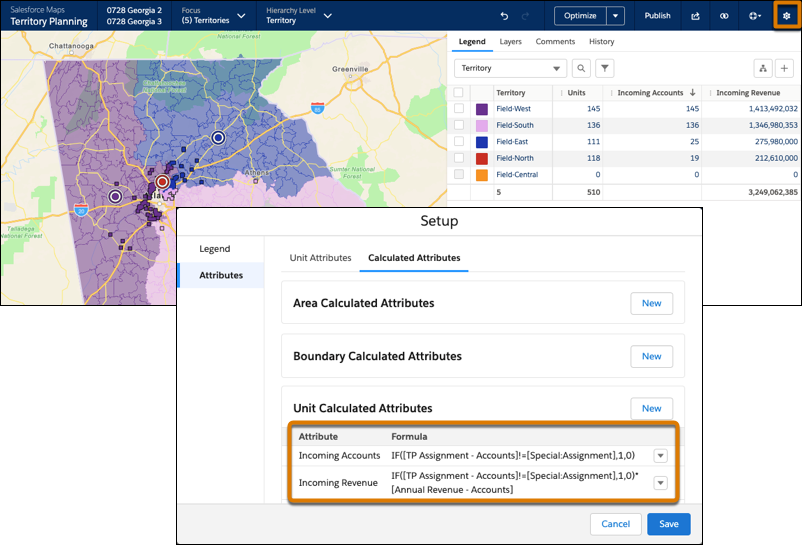
Create a calculated attribute for incoming units to territories. To help with your planning
efforts, create other calculated attributes such as revenue for those incoming units.
This example compares original with proposed assignment values. When assignments change,
Territory Planning displays the value 1.
-
Add columns for the calculated attributes to the legend.
-
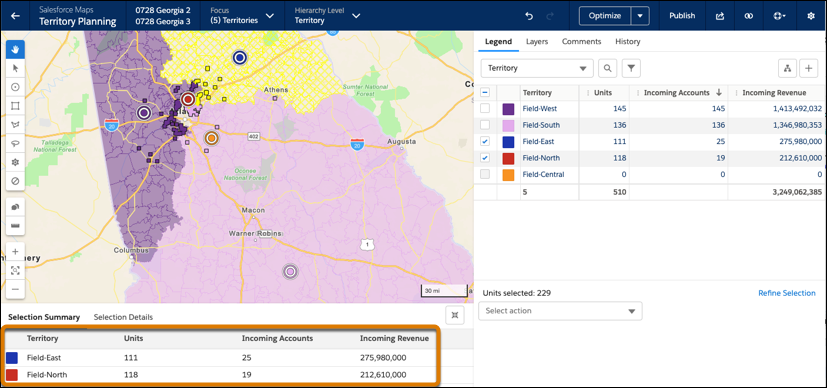
Optimize the alignment or assign units to another area. Calculated attributes that
reference special attribute fields can’t be included in optimization.
The original assignments appear next to the proposed incoming unit assignments and the
revenue that they represent.