Improve load time for alignments with high data volumes and overall performance using
data management settings in Territory Planning.
Required Editions
| Available in: both Salesforce Classic (not available in all orgs) and Lightning Experience |
| Available in: Professional, Enterprise, Performance, Unlimited, and Developer Editions with Web Services API enabled |
| User Permissions Needed |
| To manage Territory Planning options in the Salesforce Maps package: |
Customize Application |
-
From Setup, in the Quick Find box, enter Installed Packages, and
then select Installed Packages.
-
Next to the Salesforce Maps package, click Configure.
-
Under Territory Planning, click Data Management.
-
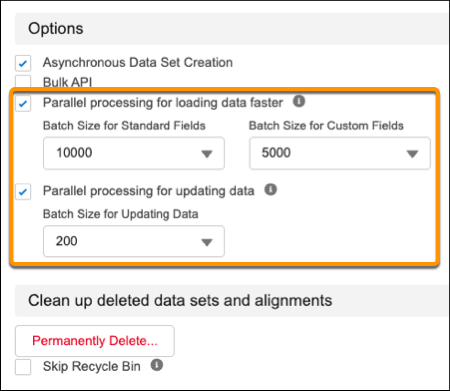
To improve load time when optimizing and updating alignments with high data volumes, select
the options to process data in parallel.
Adjust the batch size for fields and data according to your business needs.
-
To clean up obsolete datasets and alignments, click Permanently
Delete.
-
To avoid the task of removing deleted datasets and alignments from the recycle bin, select
Skip Recycle Bin.