
Slice territories into the boundaries of your choice in Territory Planning. For example, add boundaries that help you work within specific counties, census tracts, or postal codes.
Required Editions
| Available in: both Salesforce Classic (not available in all orgs) and Lightning Experience |
| Available in: Professional, Enterprise, Performance, Unlimited, and Developer Editions with Web Services API enabled |
| User Permissions Needed | |
|---|---|
| To modify alignments: |
Sales Planning Ops Analyst permission set AND Query for Datapipelines User for Sales Planning permission set AND SF Maps Territory Planning for Sales Planning permission set |
- Open an alignment and set the focus.
-
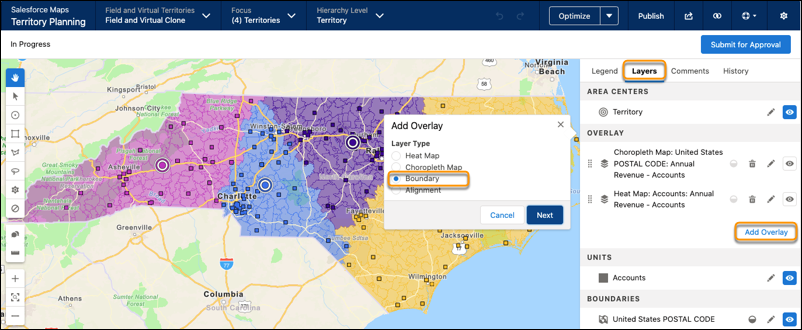
From the Layers tab, click Add Overlay, then select
Boundary. Click Next.
-
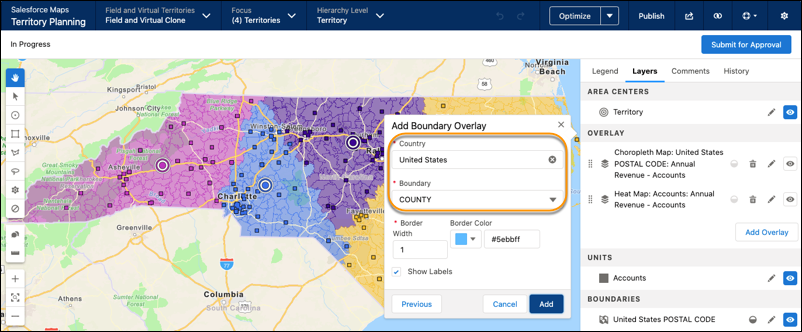
Select the country that corresponds with the focus area, then select a type of boundary
that you want to overlay on the map. For example, define your overlay to show county
lines.
-
Select a border color, then click Add.
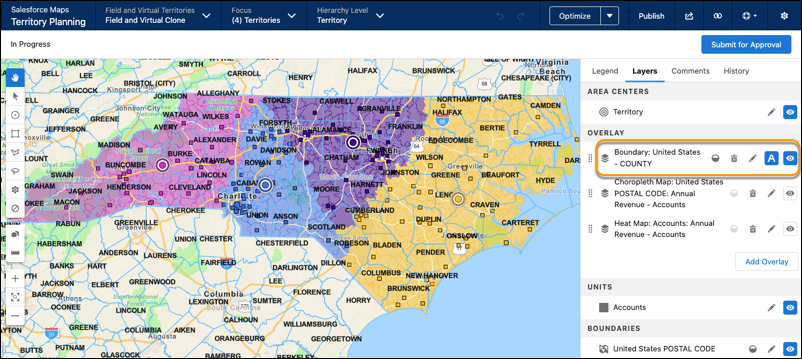 The boundary overlay appears on the map. Settings let you adjust opacity, as well as delete, edit, and hide the overlay.