Distribute accounts to reps based on their areas of responsibility, such as industry,
annual revenue, and number of employees. Fine-tune assignment rules and their criteria from
Salesforce territory models and create any other rules that matter for your sales and service
leadership in Territory Planning.
Required Editions
| Available in: both Salesforce Classic (not available in all orgs) and Lightning Experience |
| Available in: Professional, Enterprise, Performance, Unlimited, and Developer Editions with Web Services API enabled |
| User Permissions Needed |
| To modify alignments: |
Sales Planning Ops Analyst permission set
AND
Query for Datapipelines User for Sales Planning permission set
AND
SF Maps Territory Planning for Sales Planning permission set
|
-
Open an alignment whose units you want to assign using criteria in assignment rules.
-
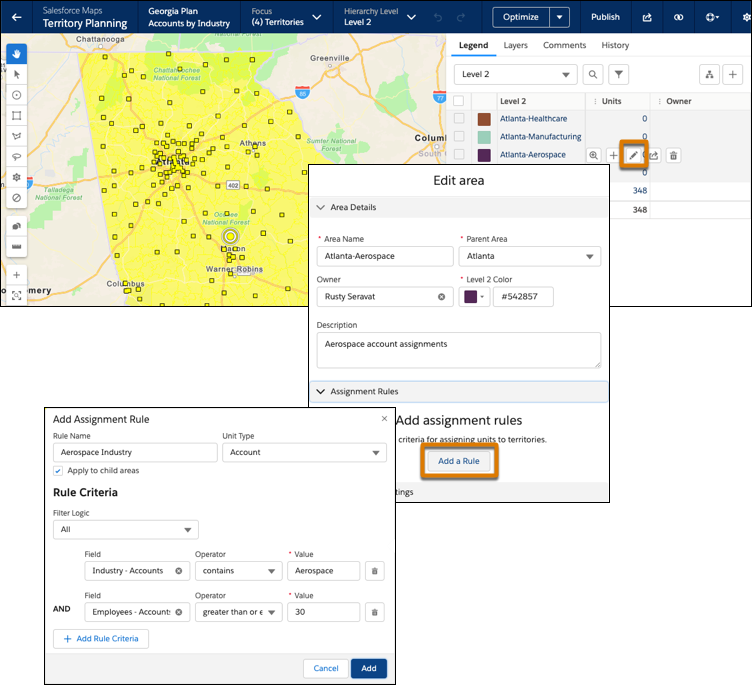
Edit an area. In Assignment Rules, click Add a Rule, and then add
criteria for assigning accounts to the area’s owner.
If you assign boundaries to areas, Territory Planning generates boundary rules, which
appear as assignment rules. If you remove boundary assignments, you also remove their
corresponding generated boundary rules.
-
Save your changes.
-
Add account rules and criteria for any other areas in the alignment.
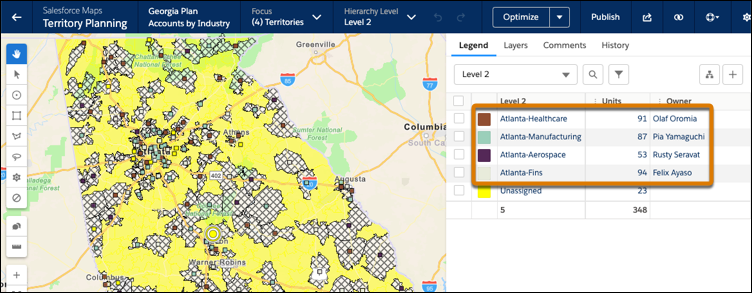
Assignment rules distribute the units to areas based on the criteria that you set.
When you publish alignments to Sales Territories, you also publish your assignment rule
updates and generated boundary rules for accounts.