
Plan your territory models in Territory Planning and import them into proprietary and third-party systems. Choose the territory model data that you publish to CSV files, which can include your territory model or specific areas, boundaries, and units.
Required Editions
| Available in: both Salesforce Classic (not available in all orgs) and Lightning Experience |
| Available in: Professional, Enterprise, Performance, Unlimited, and Developer Editions with Web Services API enabled |
| User Permissions Needed | |
|---|---|
| To publish alignments: |
Sales Planning Ops Analyst permission set AND Query for Datapipelines User for Sales Planning permission set AND SF Maps Territory Planning for Sales Planning permission set |
-
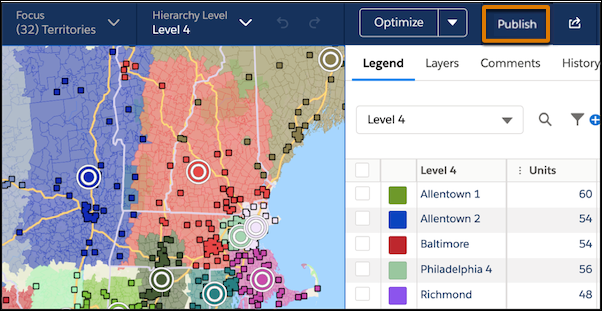
From the map, click Publish.
-
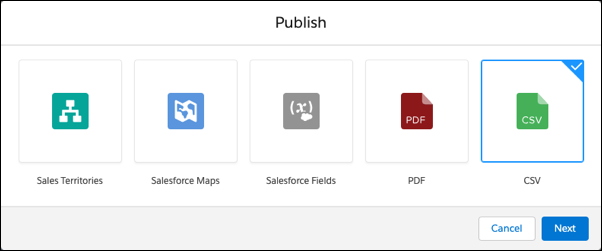
Select CSV, then click Next.
-
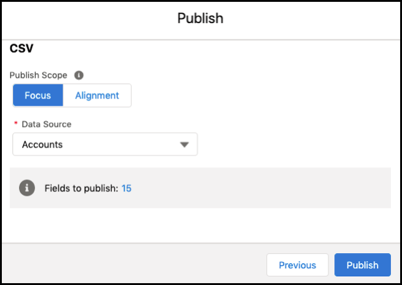
Select the scope of what to publish.
For Example, to Publish... Select... Your current focus when you change one area and want to publish those changes Focus The entire alignment when you create hierarchies for the first time or transition to a new planning model Alignment -
Select the data source that you want to publish.
-
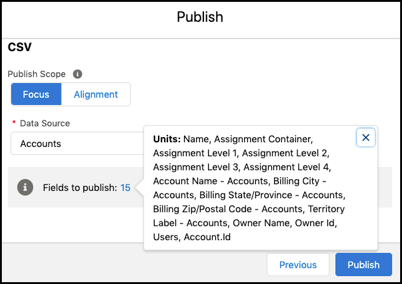
To see the fields you’re about to publish, click the highlighted number.
-
Click Publish.
Territory Planning downloads a CSV file that you can import into other systems.