When a Salesforce record is added to a tab in Microsoft Teams, you can access the same
record information that you see in Salesforce. You can make edits to record details,
view the record activity, interact with related records, and post to Chatter for the
record. Your changes and additions are saved to the record in Salesforce. The record
information updates in the tab as changes are made in Salesforce. If you’re in
Salesforce or in Teams, you’re up to date on the latest record
information.
Required Editions
| Available in: Lightning Experience |
| Available with Sales Cloud and Service Cloud in: Enterprise,
Performance, and Unlimited Editions
|
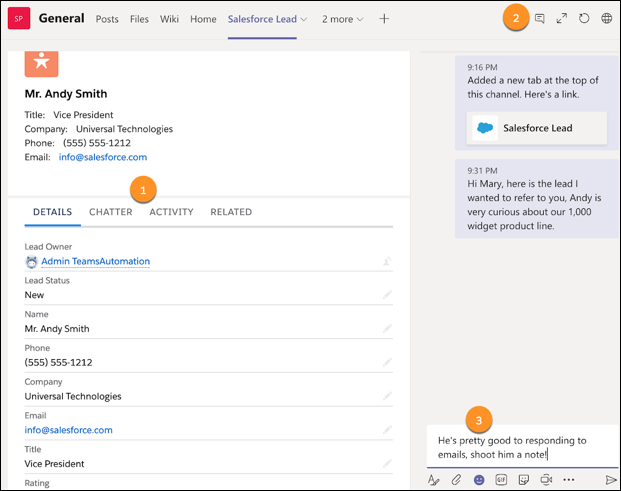
From Teams on desktop and the web, (1) access the same record details that you do
in Salesforce, including custom fields. Use the tabs to view and edit
details, keep up with Chatter posts, view the activity on the record, and
view the related records. (2) Have a conversation about the record directly
in the tab. (3) Any messages you post in the tab are also added to the
channel feed.