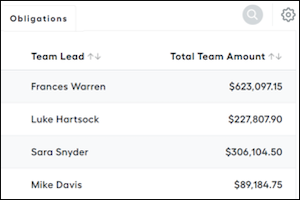
Build a calculation that sums team totals for all managers and displays the sum on the manager’s statement.
Required Editions
| Available in: both Salesforce Classic (not available in all orgs) and Lightning Experience |
| Available in: Enterprise, Unlimited, and Developer Editions |
| Available for an additional cost in: Professional Edition with Web Services API Enabled |
| User Permissions Needed | |
|---|---|
| To create data filters and worksheet calculations: |
A Spiff user role with this permission turned on. Designer Configuration: Manage |
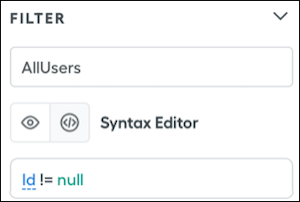
- Create an AllUsers data filter on the User object.
- Create a calculation on the User object that returns one team for each team lead.
TeamObjectsByUser = choose(1, direct_manager_of(id)) - Create a calculation on the User object that returns a string of userIds on a leads team.
UsersInTeamByLead = iferror(concat([transform_list(users_in_team(TeamObjectsByUser), Id)]), "N/A") - Create a worksheet calculation on users that sums an amount by team.
SumTeamAmount = sumif(YourDealLevelDataFilter, contains(UsersInTeamByLead, OwnerId), ARR) -
Create a worksheet calculation that returns a list of only team lead IDs.
TeamLeadIds = transform_list(filter(AllUsers, UsersInTeamByLead != "N/A"), Id) -
Create a users data filter that returns only team leads.
TeamLeadsDataFilter = contains(TeamLeadIds, Id) - Create a payout rule with a datasheet by using the team leads data filter.