
Create, rename, and delete statement periods, and manage automatic freeze and generation of statement periods.
Required Editions
| Available in: both Salesforce Classic (not available in all orgs) and Lightning Experience |
| Available in: Enterprise, Unlimited, and Developer Editions |
| Available for an additional cost in: Professional Edition with Web Services API Enabled |
To access these options, go to Settings From the Admin menu and select Statement Period Management.
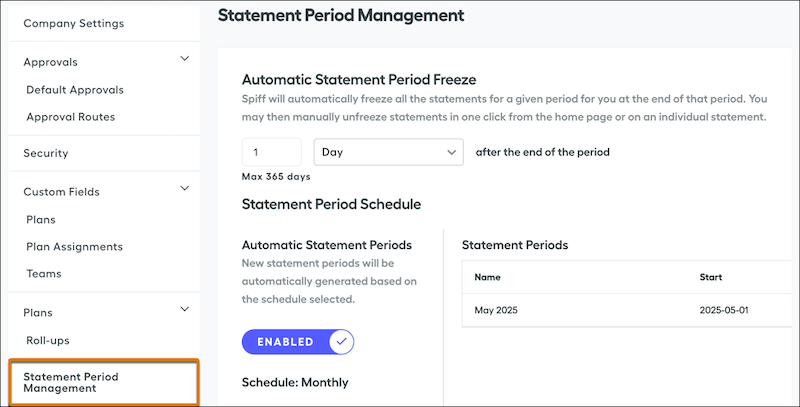
Automatic Statement Period Freeze
Manage the performance of statement recalculations when data is synced. Turn on Automatic Statement Period Freeze, which helps ensure that only current period statements are recalculated during a resync. You can unfreeze statements later from the Comissions page. See Freezing and Unfreezing Statements.
If this option is turned off and you don't freeze statements manually, a resync of data can change statements. Any unfrozen commission statements can change for all users and all periods. Depending on your number of reps and unfrozen statements, the resync can take a long time.
Automatic Statement Periods
Statements are generated automatically, and you can specify whether statement periods are also generated automatically.
To provide a smoother, more efficient experience for reps when they view statements, turn on Automatic Statement Periods. When this option is turned on, Spiff generates statement periods based on a schedule that you specify, such as weekly or monthly.
When this option is turned off, you must create each statement period manually. Reps can’t view statements for any periods that haven’t been added manually.
Impact of Changing a Statement Period Schedule
If you change a statement period schedule, you must delete all statement periods. To delete a statement period, click the trash icon. Deleting a statement period also deletes all previous statements, including frozen statements, and any attached data such as adjustments, draws, and tickets. You can’t undo the deletion of statement periods. After you delete all statement periods, you can specify a new schedule.

All changes to a statement period are recorded in the System Activity Log.