Some states and municipalities require companies to have a rep approval process for commissionable wages. Some larger companies want to add security in addition to compliance by defining the approval route to prevent system abuse, institute controls, and reduce risk. In Salesforce Spiff, request statement approvals manually or set up an automatic process for end-of-period statement approvals.
Required Editions
| Available in: both Salesforce Classic (not available in all orgs) and Lightning
Experience |
| Available in: Enterprise, Unlimited, and Developer
Editions |
| Available for an additional cost in: Professional Edition with Web
Services API Enabled |
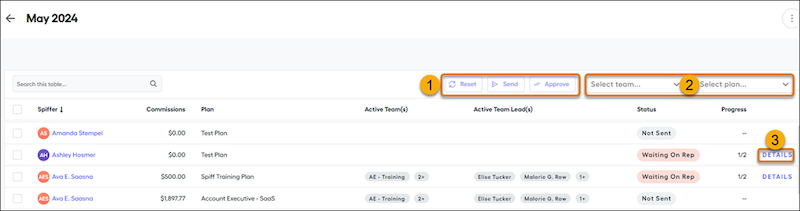
In the Approvals table, within a statement period, send statements for approval, reset
approvals, or approve (1) statements for one or more users. Filter users with the plan
or team menus (2). Spiff hides archived plans by default.
To view approval details for a sent statement, click Details (3). When each approval is complete, the responsible party’s name appears with a timestamp. The admin can approve for all roles.
Approvers receive a notification, depending on their notification settings, when it’s their turn to approve in the workflow.
To export statement approvals and approval history, first export the system activity log in .csv format. Then, in the exported log file, filter the Product/Feature column for history related to approvals.
- Set Up Statement Approval Routes
Approval routes determine who approves statements, the number of approvers, the order of approvers, approval reminders, and team lead routing. You can define multilevel approval routes with flexible approval structures for end-of-period statement approvals and document approvals. You can also set up an automatic approval process for a default approval route to reduce manual work and avoid delays.
- Manage Statement Approvals Manually
In the Approvals table, you can send statement approval requests, review statement approval progress, and approve a statement.