
Provide more information to reps about their performance against quota with emoji and messages. Motivate reps to reach their quotas by displaying the amount required to reach the quota, accompanied by a special congratulatory message upon achievement.
Required Editions
| Available in: both Salesforce Classic (not available in all orgs) and Lightning Experience |
| Available in: Enterprise, Unlimited, and Developer Editions |
| Available for an additional cost in: Professional Edition with Web Services API Enabled |
| User Permissions Needed | |
|---|---|
| To create summary calculations: |
A Spiff user role with this permission turned on. Designer Configuration: Manage |
To add emoji and messages to performance against quota, incorporate a few additional summary calculations into your rule.
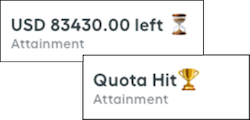
-
Include the quota performance calculation, which involves substracting the
quota currently achieved from the total quota.
In this example, the QuarterOfAnnualQuota is subtracted from the QuarterlyARR to determine the remaining amount the representative must achieve during the rest of the quarter.
QuarterOfAnnualQuota - QuarterlyARR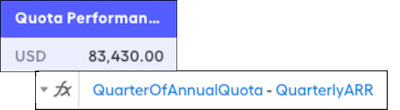
-
Include the attainment summary calculation, which is shown on the rep's statement.
In this example, if the quota currently achieved is less than the total quota, the statement shows an Under Quota message. If the quota currently achieved exceeds the total quota, the statement shows a Quota Hit message.
if(QuarterlyARR < QuarterOfAnnualQuota, EnterpriseAEUnderQuotaMessage, EnterpriseAEQuotaHitMessage)
-
Create the Under Quota message with the
concatfunctio, which combines text and numbers into a unified text string.Include the quota performance summary calculation and append the emoji and words you want at the end. To maintain clarity and proper formatting, separate the emoji and words with commas and enclose them in parentheses. With theroundfunction, simplify the quota performance calculation to two decimal places.concat([round(EnterpriseAEQuotaPerformance, 2), "left", "⏳"])
-
Create the Quota Hit message with the
concatfunction.You don’t have to incorporate another field that includes an amount. Add emoji and words you want, separate them with commas, and enclose them in parentheses.concat(["Quota Hit","🏆")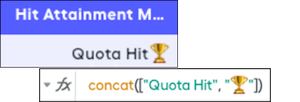
-
Add the attainment calculation as a metric card in the statement.
 The appropriate message appears depending on whether the rep is under quota or has achieved quota.