
Create a Custom Metric for the Aggregated Value Needed to Reach the Next Accelerator Tier
Boost motivation by showing reps how close they are to the next accelerator level. Create a custom metric that displays this information on their statements.
Required Editions
| Available in: both Salesforce Classic (not available in all orgs) and Lightning Experience |
| Available in: Enterprise, Unlimited, and Developer Editions |
| Available for an additional cost in: Professional Edition with Web Services API Enabled |
| User Permissions Needed | |
|---|---|
| To create a custom metric: |
A Spiff user role with these permissions turned on.
|
-
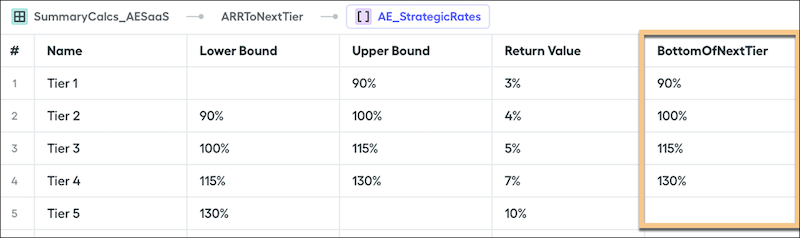
In your range table, add a column named BottomOfNextTier
that calculates accelerators.
You can also build a new range table specifically for this purpose.
-
Create a worksheet calculation named ARRToNextTier and add this formula, where
AttainmentPercentis a worksheet calculation for the sum total or aggregation of all ARR or QuotaAmount.(tier_payout(AttainmentPercent, YourTableName, false, "BottomOfNextTier") - AttainmentPercent) * QuotaAmount -
To avoid an error when the rep has maxed out their tiers, wrap part of the formula with an
iffunction that returns0instead of a negative ARR value. - In the rep's statement, add the new custom metric.