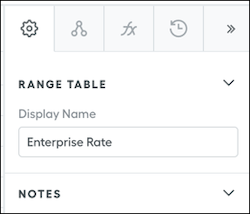
Improve sales teams’ efficiency and effectiveness by showing reps metric and field names that make sense, instead of names created from commission logic. When reps can identify deal data easily, they can adjust their plans accordingly and with peace of mind.
Required Editions
| Available in: both Salesforce Classic (not available in all orgs) and Lightning
Experience |
| Available in: Enterprise, Unlimited, and Developer
Editions |
| Available for an additional cost in: Professional Edition with Web
Services API Enabled |
| User Permissions Needed |
| To edit metric display names: |
A Spiff user role with this permission turned on.
Designer Configuration: Manage
|
-
In Designer, select the metric or field you want to update, or search for it.
-
Edit the Display Name in the Settings panel on the right side of the screen.
The display name updates the name of the field on the statement. The original name remains as the title for the metric of the field.