
A lump-sum rule pays out one obligation amount that you define with calculations. The final payout calculation comes from a single cell in a worksheet. Worksheets contain formulas that have a single value, either entered directly or as the result of a formula.
Required Editions
| Available in: both Salesforce Classic (not available in all orgs) and Lightning Experience |
| Available in: Enterprise, Unlimited, and Developer Editions |
| Available for an additional cost in: Professional Edition with Web Services API Enabled |
In this example, a rep's commission is calculated each month by multiplying their monthly attainment by their $4,500 monthly target variable compensation. Assume that the rep has a monthly quota of $20,000 and they’ve closed four deals.
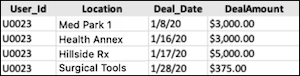
A lump-sum rule doesn't apply a calculation to each item in this filter. Instead, this rule sums the deal amount field to eventually determine the rep's attainment.
Calculate the rep's sum for the amount closed in the period, TotalDealAmount. The four deals sum 3,000 + 3,000 + 5,000 + 375, which results in $11,375 for the period.
=sum(ClosedInPeriod!DealAmount)To find the rep's AttainmentPercent, divide the sum by the quota.
=TotalDealAmount/Quota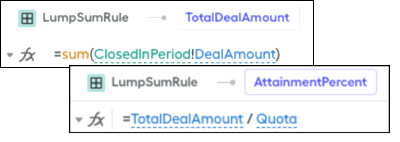
Because the rep has a $20,000 quota, $11,375 divided by $20,000 results in 56.9% attainment for the rep that month. To calculate the rep's LumpSumCommission, the input criteria multiplies the attainment by the TargetVariableCompensation value of $4,500. The rep ends up taking home around $2,560.50 for the month.
=TargetVariableCompensation*AttainmentPercent
Lump-sum rules are also helpful when you want to provide an incentive when reps exceed a target. For example, when the total annual recurring revenue from renewals that a rep brings in monthly is greater than $15,000, maybe the rep receives a $1,000 bonus.
