Payout rules let you create calculations that determine how your reps earn a commission. Line-by-line rules calculate a commission amount by applying a calculation to each item in a data filter such as a deal or an opportunity. Calculation output from each item is summed to get the total for the rule.
Required Editions
| Available in: both Salesforce Classic (not available in all orgs) and Lightning
Experience |
| Available in: Enterprise, Unlimited, and Developer
Editions |
| Available for an additional cost in: Professional Edition with Web
Services API Enabled |
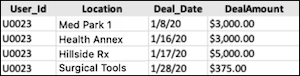
A common filter is for deals closed by a rep in a period. In this scenario, a rep has four deals in their closed-in period data filter.
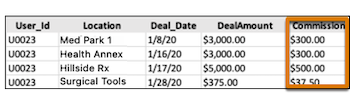
Define a line-by-line rule calculation as 10% of the Deal Amount.This calculation appliesto the four deals. Each record has its respective deal amount multiplied by 10% to get the outputs in the Commission column. The output of these calculations in the Commission column is summed to get the rule total. Commission plans can be complex, but understanding the concept helps you determine what approach to take when building your own rules.
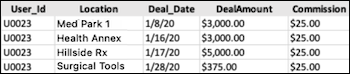
Another line-by-line rule example is when a rep earns $25 for each new subscription they sell. Every deal flagged as a new subscription is the data filter and each new subscription receives the $25 commission. The Commission column is the calculation applied to each deal. The rep earns $100 in total commission for this rule.