Create a more dynamic, fair, and motivating compensation structure that drives sales performance and supports the unique needs and goals of your sales team. Instead of a flat commission rate, pay commission for on-target earnings (OTE) using an individual commission rate (ICR) or attainment percentage.
Required Editions
| Available in: both Salesforce Classic (not available in all orgs) and Lightning Experience |
| Available in: Enterprise, Unlimited, and Developer Editions |
| Available for an additional cost in: Professional Edition with Web Services API Enabled |
| User Permissions Needed | |
|---|---|
| To create attainment rules with quotas: |
A Spiff user role with this permission turned on. Designer Configuration: Manage |
Example 1: Pay Commission with an Individual Commission Rate
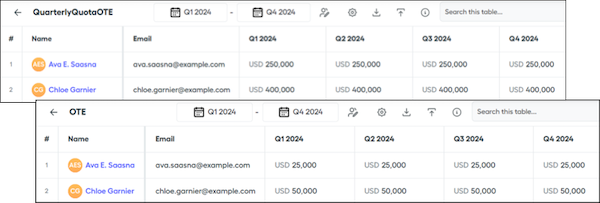
Consider an example where a rep has a quarterly quota of $250,000 and an OTE of $25,000. If they achieve their quarterly quota, the ICR calculation is $25,000 divided by $250,000, or 10%. Giving a 10% commission rate to each closed deal pays $25,000 by the time they close $250,000. This option pays a $1,000 commission for a $10,000 deal.
-
Create two quota tables, QuarterlyQuota_OTE for the quarterly data and OTE_Worksheet for the OTE.
-
Create a worksheet and use the
quota()function to reference both of the quarterly quota and OTE tables. -
Create an ICR calculation that uses both of these values.
Give your calculation a name that's unique from the name of the quota table.
OTE_Calc = OnTargetEarningsOTE / QuarterlyQuota_OTE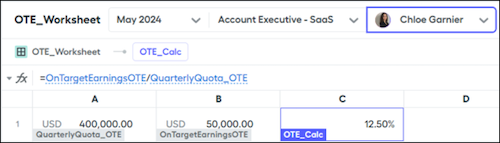
-
Create a datasheet with a data filter such as ClosedInQuarter and commission each deal at the rep's OTE percentage.
OTE_Commission = ARR__c * OTE_Worksheet!OTE_Calc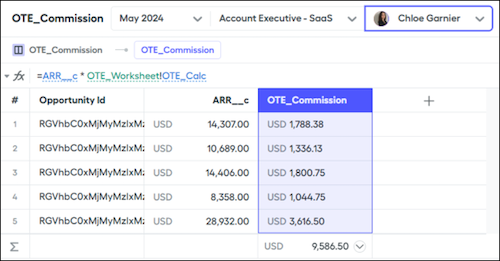
Example 2: Pay Commission for Attainment Percentage
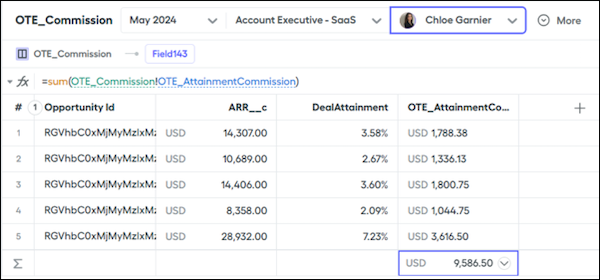
Consider another example with the same quarterly quota of $250,000 and an OTE of $25,000. Instead of calculating an ICR, calculate the attainment percentage of each deal and multiply that value by their OTE. In this case, a $10,000 deal is 4% of their total attainment, so the calculation is $10,000 dividied by $250,000, or 4%. Then, multiply the $25,000 OTE amount by 4%, or $1,000.
-
Create two quota tables, QuarterlyQuota_OTE for the quarterly data and OTE_Worksheet for the OTE.
-
Create a worksheet and use the
quota()function to reference both of the quarterly quota and OTE tables. -
Use the worksheet calculation to reference the quarterly quota table.
DealAttainment = ARR__c / OTE_Worksheet!QuarterlyQuota_OTE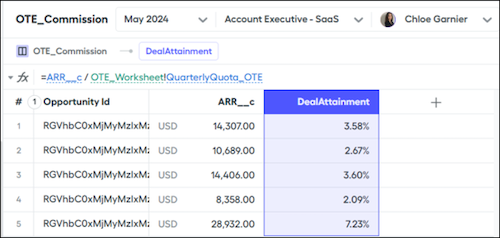
-
Multiply the individual deal attainment against the rep's OTE, which returns a commission amount.
= sum(OTE_Commission!QTE_AttainmentCommission)