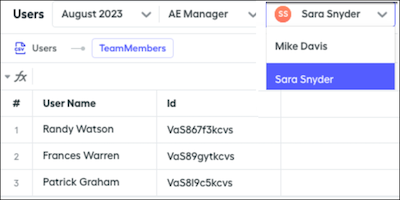
With a rollup filter of users that belong to the same team in Salesforce Spiff, you can calculate the number of team members when a plan component requires splitting an element equally across the team members. Or, check how many team members achieve quota for a component of a manager plan.
Required Editions
| Available in: both Salesforce Classic (not available in all orgs) and Lightning
Experience |
| Available in: Enterprise, Unlimited, and Developer
Editions |
| Available for an additional cost in: Professional Edition with Web
Services API Enabled |
| User Permissions Needed |
| To create a rollup filter: |
A Spiff user role with this permission turned on.
Designer Configuration: Manage
|
-
In Designer, click Data and then Filters.
-
Click the three dots next to the Users object and select New Rollup Filter.
-
Select how you want to credit the rollup and click Next.
-
Save your changes.
-
Select a time period.
The rollup filter provides a dynamic list of team members for all team leads, and you can reference this list in a datasheet for calculations and plan components.