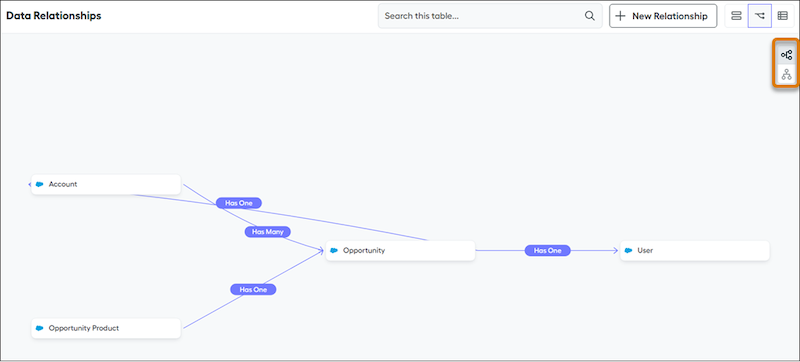
Salesforce Spiff organizes data used for calculating commissions in multiple separate tables. To calculate commission logic correctly or create data filters, establish relationships between tables. A relationship requires a field in each table with a common value. For example, to connect Deals with Accounts, the values of the Deals table's CustomerAccount field match the values of the Accounts table's external_id field.
Required Editions
| Available in: both Salesforce Classic (not available in all orgs) and Lightning
Experience |
| Available in: Enterprise, Unlimited, and Developer
Editions |
| Available for an additional cost in: Professional Edition with Web
Services API Enabled |
Each relationship is one-way, so the CustomerAccount field on the Deals table represents a one-way relationship from Deals to Accounts. To create a reciprocal relationship from Accounts to Deals, establish a separate relationship. You can reuse the same fields in both directions.
A relationship can be one-to-one, one-to-many, or many-to-many.
To view established relationships in Spiff, go to the Data tab in Designer and click Data Relationships. The relationship map visualizes your related tables and shows the type of each relationship. In the map, you can rearrange objects and switch between horizontal and vertical views.