Track manual adjustments to attainment amounts with a quota table, which provides an auditable log of adjustment entries that you can reference in calculations for all statement statement periods. Overwriting a value on a statement applies only to the rep for a specific statement period, but a quota table provides a more permanent and reliable solution.
Required Editions
| Available in: both Salesforce Classic (not available in all orgs) and Lightning
Experience |
| Available in: Enterprise, Unlimited, and Developer
Editions |
| Available for an additional cost in: Professional Edition with Web
Services API Enabled |
| User Permissions Needed |
| To manage attainment adjustments with a quota table: |
A Spiff user role with this permission turned on.
Quotas: Edit
|
-
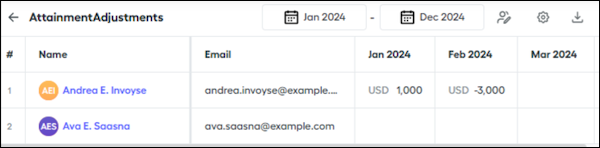
Create a quota table, named AttainmentAdjustments, for your adjustment amounts.
-
Create a worksheet calculation, named YTDAttainmentAdjustment, that references the adjustment amounts from the quota table.
-
Create another worksheet calculation, named YTDAttainment, that sums the amounts year-to-date.
Make sure that the summation ends with the current period to prevent future month adjustments from influencing an unfrozen period.
=sum(quotas(rep, "AttainmentAdjustments", BeginningOfYear, EndOfPeriod), amount)
-
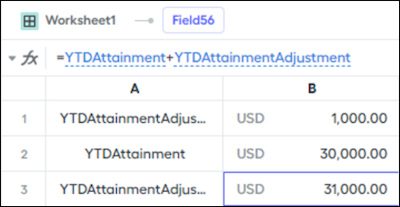
Add the YTDAttainment calculation to the YTDAttainmentAdjustment calculation.
=YTDAttainment + YTDAttainmentAdjustment
In this example, a rep has YTD attainment of $30,000 with a January adjustment of $1,000 and a February adjustment of -$3,000. The adjusted YTD amount for January becomes $31,000 and the adjusted amount for February becomes $28,000.