In Salesforce Spiff, create plans that are visible only to certain users so that you
can generate reports, experiment with new rules, perform mid-year changes, or prepare plans
in advance.
Required Editions
| Available in: both Salesforce Classic (not available in all orgs) and Lightning
Experience |
| Available in: Enterprise, Unlimited, and Developer
Editions |
| Available for an additional cost in: Professional Edition with Web
Services API Enabled |
- Plans are hidden by default when you create them.
- Commission payouts calculated in hidden plans aren't visible to reps.
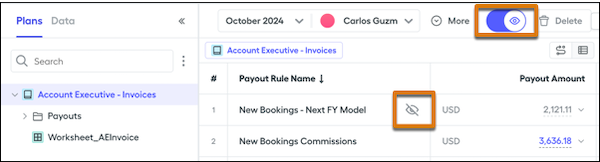
- When a plan is hidden, an icon appears wherever the plan is referenced.
- Assign reps to multiple plans, including hidden plans.
- Hidden plans show a $0.00 value for commissions for all reps.
- When you're ready for a plan to be available to all assigned reps for applicable
statement periods, unhide the plan.
Hidden plans are visible only to users with one of these privileges. They can see
calculated payout rules for hidden plans when they view a rep's statement.
- The default Company Admin role
- The default Finance role
- A custom role with the Statements: View Hidden permission turned on