Compares a list of filtered numbers that represent rep metrics in Salesforce Spiff, such as monthly attainment, and returns a ranking relative to the rest of the list. This function doesn't break ties and awards the same ranking to all numbers that tie.
Required Editions
| Available in: both Salesforce Classic (not available in all orgs) and Lightning Experience |
| Available in: Enterprise, Unlimited, and Developer Editions |
| Available for an additional cost in: Professional Edition with Web Services API Enabled |
Syntax
rank(target, filter, rank_by)Arguments
| Argument | Required? | Description |
|---|---|---|
| target | Required | The field or object that you want to rank. |
| filter | Required | A data filter that specifies the data that you want to use for ranking. |
| rank_by | Required | The criteria for sorting and ranking the filtered data. |
Example
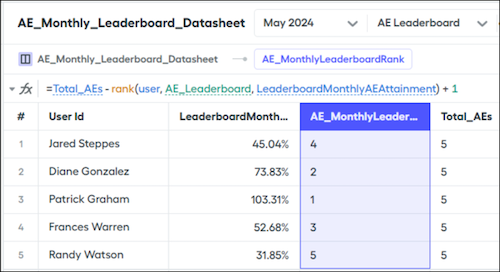
Create a rollup data filter named AE_Leaderboard, based on the User object, that returns the users from different AE teams. Rank users in this data filter by the output of the LeaderboardMonthlyAttainment calculation.
=rank(user, AE_Leaderboard, LeaderboardMonthlyAttainment)By default, this function's return ranking sorts data from lowest to highest. If you sort five users by monthly attainment, the rep with the highest attainment is ranked fifth.
To invert the ranking results so that the rep with highest attainment is ranked first, use the output of the rank() function in another formula. If you're sorting five users, maybe you have another calculation, Total_AEs, that counts the number of users, subtracts the rank, and adds 1.
=Total_AEs - rank(user, AE_Leaderboard, LeaderboardMonthlyAttainment) + 1