
Checks whether a date falls within an upper and lower date range in Salesforce Spiff. When used in a calculated field, this function returns true or false.
Required Editions
| Available in: both Salesforce Classic (not available in all orgs) and Lightning Experience |
| Available in: Enterprise, Unlimited, and Developer Editions |
| Available for an additional cost in: Professional Edition with Web Services API Enabled |
Syntax
date_between?(date, start_date, end_date)Arguments
| Argument | Required? | Description |
|---|---|---|
| date | Required | The date to check. This argument supports any date functions. |
| start_date | Required | The lower bound of the date range to check. This argument supports any date functions. |
| end_date | Required | The upper bound of the date range to check. This argument supports any date functions. |
Considerations
The date_between?() function is a default function when you turn off Syntax Editor when creating a data filter in Designer. For example, a filter where CloseDate is within the Current Period is the same as this function.
date_between?(CloseDate, statement_period.start_date, end_of_period(statement_period.start_date))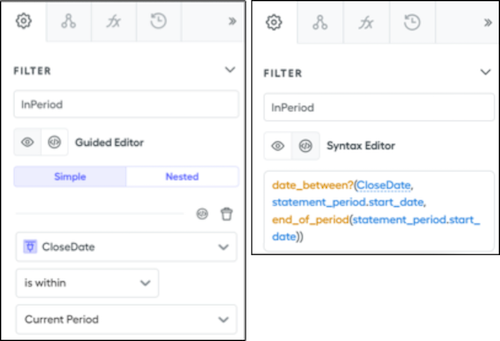
Example
Check whether a rep's ramp start date is January 1 falls within a statement period's start and end date.
=date_between?(date("2024-01-01"), statement_period.start_date, statement_period.end_date)