
Checks whether every record in a data filter or datasheet in Salesforce Spiff satisfies one or more conditions. This function returns true when the condition is satisfied. This function is the opposite of the any? function.
Required Editions
| Available in: both Salesforce Classic (not available in all orgs) and Lightning Experience |
| Available in: Enterprise, Unlimited, and Developer Editions |
| Available for an additional cost in: Professional Edition with Web Services API Enabled |
Syntax
all?(datasheet_or_filter, condition)Arguments
| Argument | Required? | Description |
|---|---|---|
| datasheet_or_filter | Required | The datasheet or filter that specifies the list of records to test. |
| condition | Optional | The condition to test. Use any expression or formula that results in true or false. To compare values, specify comparison operators or logical functions such as AND or OR. For example, to test whether the ARR field is greater than $100,000, enter ARR > 100000. |
Example
Test whether all rows for the ARR field in the BigDealsSheet datasheet have a value greater than $100,000.
=all?(BigDealsSheet, ARR > 100000)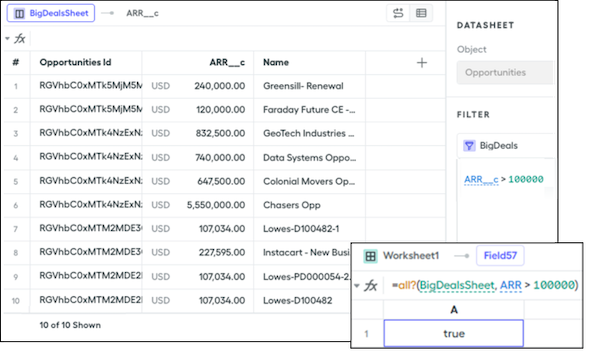
Because all the values exceed $100,000, this function returns true. If you change the condition to test for $50,000, this function returns false.
If the datasheet or filter contains no rows or records, this function returns true. To test whether the datasheet or filter includes at least one record first, add an any() function before the all?() function.
=any?(BigDealsSheet, true) AND all?(BigDealsSheet, ARR > 100000)