
Some commission expense scenarios in Salesforce Spiff require some creativity and workarounds.
Required Editions
| Available in: both Salesforce Classic (not available in all orgs) and Lightning Experience |
| Available in: Enterprise, Unlimited, and Developer Editions |
| Available for an additional cost in: Professional Edition with Web Services API Enabled |
Long-Term
To handle commission expenses for periods that are longer than 12 months, create a separate portfolio for the long-term portion, based on the original portfolio. The differences between the original and long-term portfolio are the amounts to expense and the end dates.
Average Duration
Start with an original portfolio, New Bookings Commission, where the commission amounts are amortized over 36 months using this Commission Values rule.
if(ProductName = "Services", 0, obligation.amount)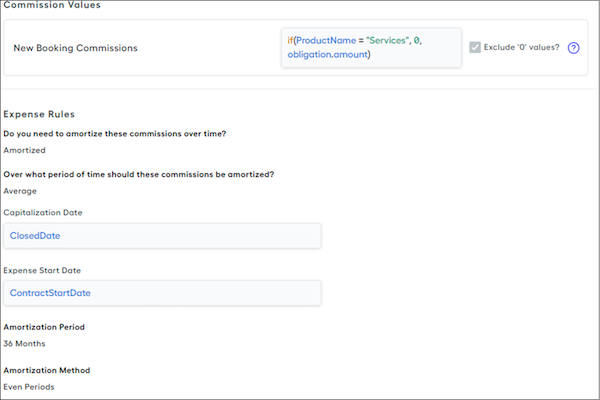
To create a separate portfolio for handling long-term assets, create a separate portfolio with almost the same entries, but small changes.
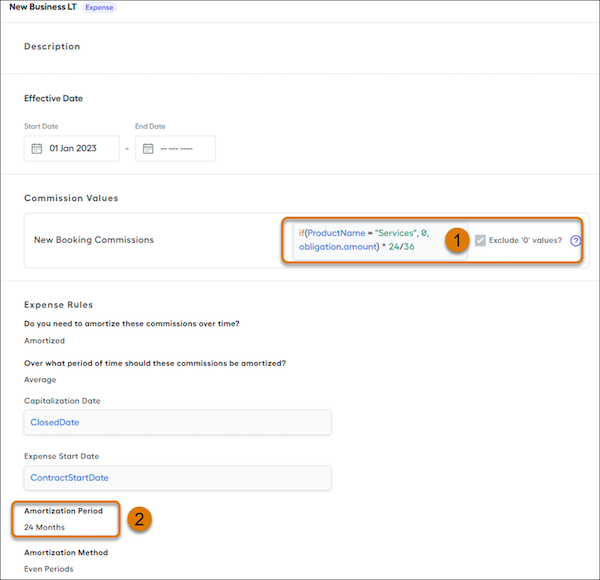
In the separate portfolio, the Commission Values rule (1) includes logic that calculates only the long-term amount to expense.
if(ProductName = "Services", 0, obligation.amount) * 24/36The Amortization Period (2) also changes from 36 to 24 months to match the long-term allocation.
Dynamic Duration
Add logic in the Additional Logic and End Date fields that accounts for the percent of assets that are long-term. We recommend that create a field in Designer that specifies the formula for this extra logic.
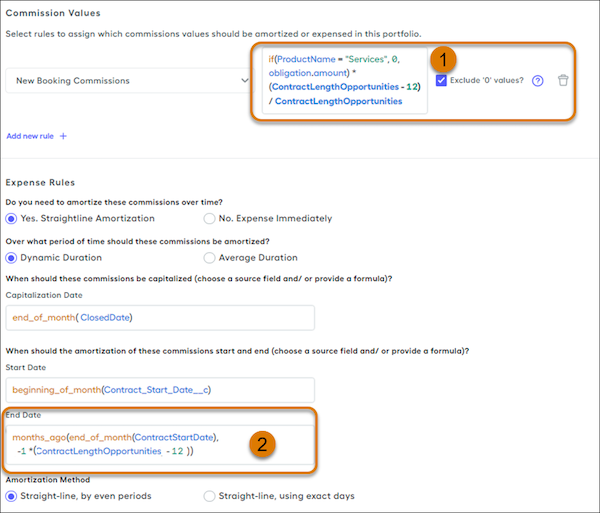
For example, create a ContractLengthOpportunities calculated field that returns the number of months in a contract, and reference that calculated field in the the Commission Values rule (1).
if(ProductName = "Services", 0, obligation.amount) * (ContractLengthOpportunities - 12) / ContractLengthOpportunitiesThe amortization period ends 12 months earlier than the original portfolio, so the End Date (2) calculates the end of the adjusted contract length.
months_ago(end_of_month(ContractStartDate), -1 * (ContractLengthOpportunities, -12))Accrued
If you have payout rules that split earned commission and paid commission, you can reference those rules in a commission expense portfolio.
For example, maybe you have this payout rule for a rep who receives half of their commission when a deal closes and receives the remaining half after the invoice is paid.
Subscription_Commission_USD_FY24 * CommissionAdvanceRate_InitialPct + One_Time_CommissionThis rule captures the total commission earned and represents the total amount to expense. Although the rule logic multiplies this amount by a percent that represents the 50% amount they're paid in the period, you have a calculated value for the total commission that you can reference in a portfolio.