
Update custom settings to add child object mappings.
Required Editions
| Available in: both Salesforce Classic (not available in all orgs) and Lightning Experience |
| Available in: Enterprise, Unlimited, and Developer Editions |
| Available for an additional cost in: Professional Edition with Web Services API Enabled |
| User Permissions Needed | |
|---|---|
| To edit Salesforce object field sets: | (Salesforce) Customize Application |
| To edit Salesforce custom settings: | (Salesforce) Customize Application |
In this example, configure the Opportunity Split child object.
Create a Field Set for the Child Object
- From the Object Manager in Setup, select the Opportunity Split object.
-
On the Details tab, copy the object's API name,
OpportunitySplit.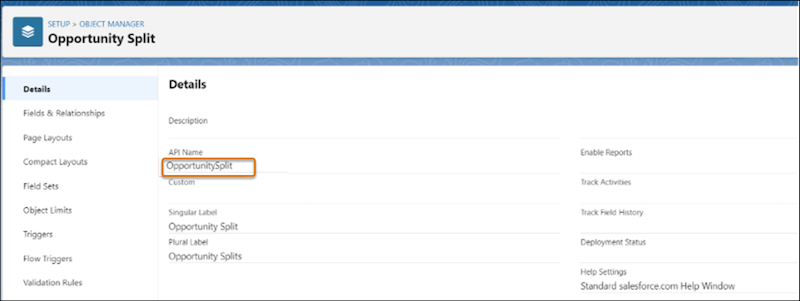
- Select Field Sets.
-
Click New and enter these values.
Field Set Label Spiff Opportunity Split Commission Field Field Set Name Spiff_Opportunity_Split_Commission_Field, which is the API name of the field set Where is this used? Any value - Drag fields you want to add to the field set, and save your changes.
Update Custom Settings
- From Setup, in the Quick Find box, enter Custom Settings, and then select Custom Settings.
- For Child Object Mapping for Spiff, click Manage.
-
Click New and enter these details.
Name A name for the mapping Parent Object API Name Opportunity Child Object API Name OpportunitySplit, the API name of the child object you added a field set to Child Object Fieldset API Name Spiff_Opportunity_Split_Commission_Field, the API name of the field set you created Active Enabled - Save your changes.