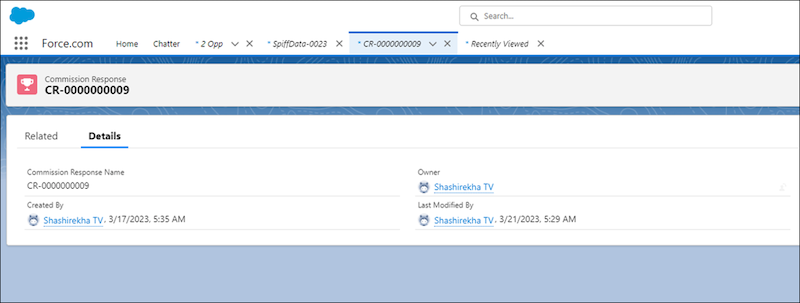
Hide the custom fields of the Commission Response and Spiff Commission Data objects from admins who don’t have Salesforce Spiff Commission Admin permission set.
Required Editions
| Available in: both Salesforce Classic (not available in all orgs) and Lightning
Experience |
| Available in: Enterprise, Unlimited, and Developer
Editions |
| Available for an additional cost in: Professional Edition with Web
Services API Enabled |
| User Permissions Needed |
| To edit Salesforce profiles: |
(Salesforce) Manage Profiles and Permission Sets |
-
Log in to Salesforce as an admin who doesn't have the Spiff Commission Admin permission set.
-
From Setup, in the Quick Find box, enter Profiles, and then select Profiles.
-
Select System Administrator.
-
Select Object Settings.
-
Turn off access for the fields.
-
Select Commission Responses.
-
Click Edit.
-
Turn off Read Access and Edit Access for all custom fields, and save your changes.
-
Repeat these steps for the Spiff Commission Data object.
-
Verify that you can view only standard fields on these objects, but can't view any custom fields.
-
From the App Launcher, go to Commission Responses.
-
Select a commission response record.
-
Repeat these steps for the Spiff Commission Data object.