
Quickly find any calculation, field, data filter, table, rule, or relationship in Salesforce Spiff Designer.
Required Editions
| Available in: both Salesforce Classic (not available in all orgs) and Lightning Experience |
| Available in: Enterprise, Unlimited, and Developer Editions |
| Available for an additional cost in: Professional Edition with Web Services API Enabled |
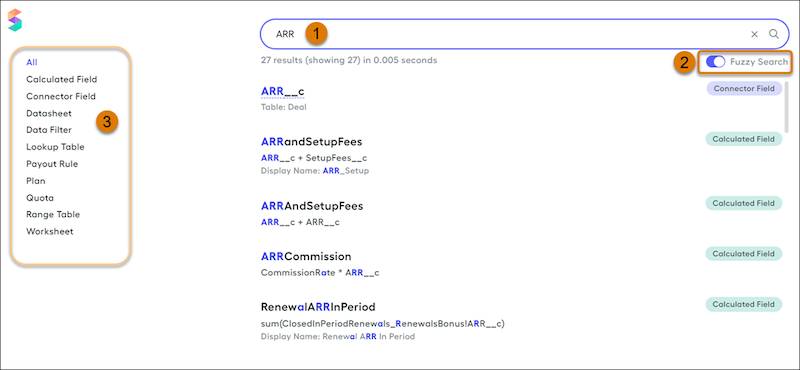
- Enter search term (1).
- To return all items that contain any of the letters as your search term but in the same order, turn on Fuzzy Search (2). To return only items that exactly match your search term, turn off Fuzzy Search. For example, if you search for Three and Fuzzy Search is on, the function ARRThresholdMet is returned. If Fuzzy Search is off, this function isn't returned.
- To further filter the results, select a specific item type (3).
Updating Changed Items
If you update syntax in a calculation or data filter and you want to find every item where the previous value was referenced, search for the old syntax. From the results, you can begin making updates.
Resolving Error Messages
If an error message references a specific field that's causing an issue, search for the field name. From the results, locate the field that you want to fix.