
Design territories with the latest Salesforce data. When you carve territories from segments in Sales Planning, you work with the latest data for records that meet the rules and criteria for those segments.
Required Editions
| Available in: both Salesforce Classic (not available in all orgs) and Lightning Experience |
| Available for an additional cost in: Enterprise, Performance, Unlimited, and Developer Editions with Sales Planning in English only, and only if you have Web Services API enabled |
| User Permissions Needed | |
|---|---|
| To carve territories from segments: |
One of these:
AND One of these:
AND SF Maps Territory Planning for Sales Planning permission set |
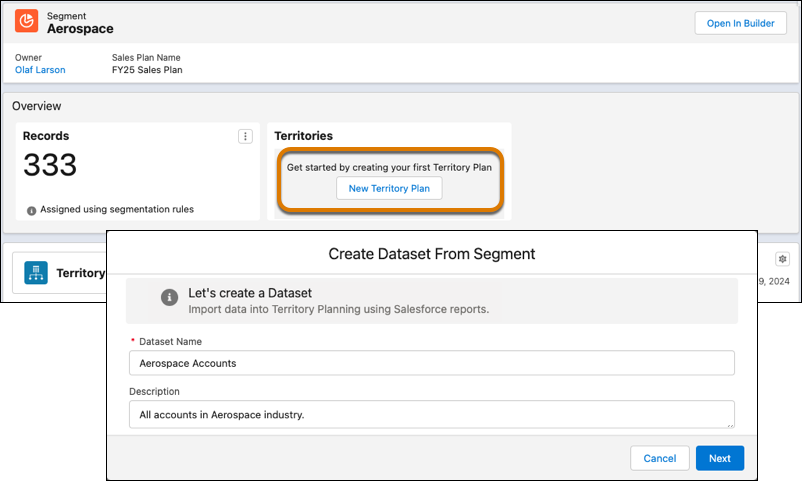
- In Sales Planning, open the segment you want to plan territories for.
- Click New Territory Plan, and then enter a name for your dataset.
- Select the data sources for your dataset, and then click Next.
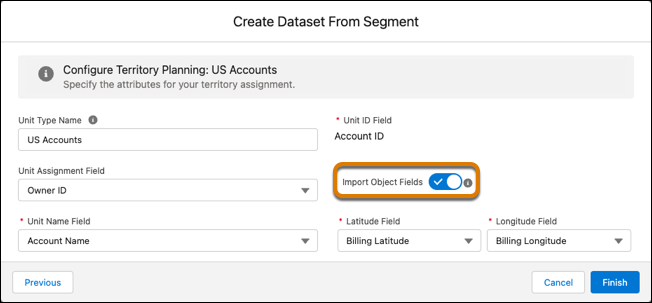
- Specify fields for assignments and location details. To select from a wider range of fields, select Import Object Fields.
- Select the attributes that you want to include in your territory plan. Then click Finish.
Territory Planning creates a dataset that includes records that meet the rules and criteria for your segment.