
Learn how Salesforce Maps Advanced determines the dates for customer visits by using minimum and maximum days between visits.
Required Editions
| View supported editions. |
Minimum and maximum days between visits, or visit frequency, determine when the next customer visit occurs. When you create a visit plan, you specify the visit frequency by entering the number of days or by specifying object fields containing the number of days.

Example During a 3-month planning period, your account requires three visits, or one a month. You
divide the total days in the period (90) by the number of expected visits (3) to get 30 days
maximum between visits. In your visit plan, you specify the maximum days between visits as 30. To
increase the likelihood of visits occurring within those 30 days, you set the minimum days
between visits as 27.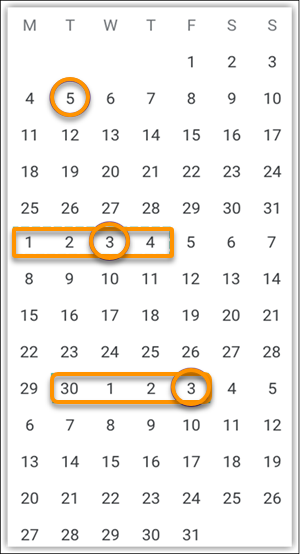
To adhere to the minimum and maximum days between visits, we see that the rectangles show when visits can occur. The circles show the days that Salesforce Maps Advanced scheduled the visits.