To support customer promotions in Salesforce Maps Advanced, prioritize visits to
customers within a particular timeframe. This timeframe is in addition to the visit frequency
requirements specified in the dataset. By default, one additional visit is scheduled to the
customer location during the promotional window.
Required Editions
-
Confirm that your routable object, or an object that looks up to your routable object,
contains fields that represent your promotion start and end dates. If you require more
than one additional visit during the promotion, confirm that your object contains numeric
fields that represent the minimum and maximum days between promotional visits.
-
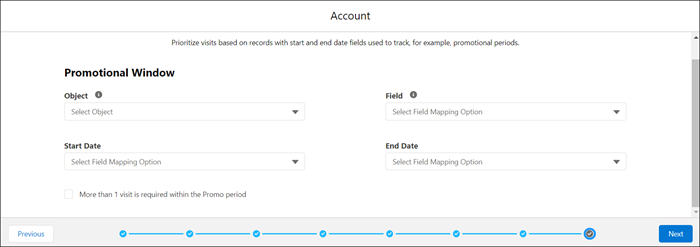
In the dataset wizard, under Promotional Window, select the routable object that
contains the start and end date fields that you want to use.
-
From the Field list, select the field that relates the promotional window object to the
routable object. If you selected the routable object in the previous step, leave this field
blank.
-
From the Start Date and End Date lists, select the fields that correspond to the
promotional window start and end dates.
-
If you require two or more additional visits during the promotional window, select
More than 1 visit is required within the Promo period.
-
Check that you have two numeric fields in the promotional window object that represent
the minimum and maximum days between promotional visits.
-
Select those fields in Minimum Days Between Visits and Maximum Days Between Visits.
-
Click Next.
Prioritize Data Sets appears in the visit plan wizard.
When reps generate routes, Salesforce Maps Advanced schedules additional visits within the
promotional period. If the rep already met minimum days between visits or exceeded the visit
target, the system still attempts to schedule a visit to the location within the promotional
period dates.