
To reschedule missed visits during route optimization, specify how your reps log completed visits.
Required Editions
- In the dataset wizard, from the Visit Object list, select the object that indicates that a scheduled visit is complete. This object can be the output (calendar) object or another object that has a lookup relationship with the routable object.
-
From the Lookup Field to Visited Object list, select the field that relates the object to
the routable object.
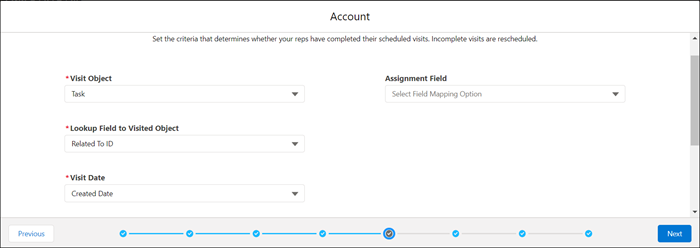
- From the Visit Date list, select the date or timestamp field that indicates when a visit was completed.
-
From the Assignment Field list, select the field that represents the user who completed the
visit.
If you have multiple reps visiting the same account but with different visit frequencies, select Created by ID as your assignment field. When you select Created by ID, Salesforce Maps Advanced matches the rep with the visit plan that they’re assigned to and applies their visit to the appropriate visit requirement.For example, suppose you have a sales rep and a merchandiser who visit the same accounts at different timeframes. You want the sales rep's visit to be counted towards sales visit targets, not merchandiser visit targets. To track visits by user, select Created by ID as your assignment field.
-
Under Field Filters, add filter criteria to narrow down the records representing completed
visits that you want to include in the dataset.
For example, after reps log a visit, they create a task with a subject starting with “Check In At.” So, you specify Task as the visit object. You have a Related To ID field that looks up to your routable object, so you specify Related To ID as your lookup field. Under Field Filters, you specify Subject contains Check In At.
-
Click Next.
Tooltip settings appear in the dataset wizard.

Example
The custom output object for your visit plan is based on the Consumer Goods Visit object. When reps complete a visit, they set the Status to Completed. You include this criteria as a filter to ensure that these visits count towards visit targets when the rep generates routes.