
In your Salesforce Maps Advanced dataset, select the records you want to route and indicate the field to determine the user responsible for visiting customer locations. For example, an account rep or merchandiser user.
Required Editions
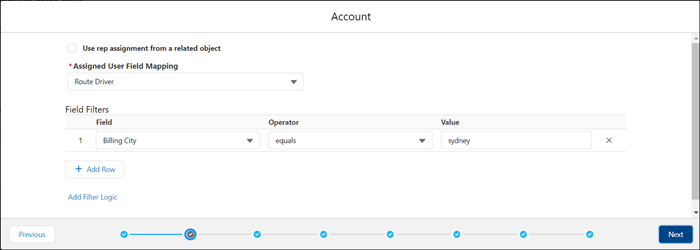
- In the dataset wizard, from the Assigned User Field Mapping list, select the lookup field that represents the user who is responsible for visiting locations in the dataset. For example, a Route Driver field.
-
If your user field is in a child object related to the routable object, select
Use rep assignment from a related object and complete the
following fields.
This field... Contains... Child Object An object containing the user field, such as the rep. Relationship Field A field that relates the child object to the routable object. Assignment Field A field that represents the user who is responsible for visiting locations in the dataset. Assignment Criteria Filter criteria to narrow down the users to use for record assignment. -
Under Field Filters, add filter criteria to narrow down the records that you want to
route in the dataset. For example, you want to limit your dataset to customers in Sydney,
Australia, so you add filter criteria for the Billing City field. If you don’t add any
filters, all records with the user criteria that you specified are included in your
dataset.
-
Click Next.
Visit requirements appear in the dataset wizard.

Example
You use the Account object as your routable object for the dataset. Related Account Team Member object records represent account users. Because there can be multiple team members per account, you filter user records to those records with a Team Role field that equals Account Manager to use in the dataset.