Help your sales reps save time and honor customers’ visit windows by creating shared
visit windows for chains and franchises. For example, as a sales and service operations manager,
you create windows in Salesforce Maps Advanced that restrict visits to begin and end during
certain time frames. Your reps apply those visit windows to the accounts that they sell to and
serve.
Required Editions
-
From the App Launcher, find and select Maps Advanced Shared Visit
Windows.
-
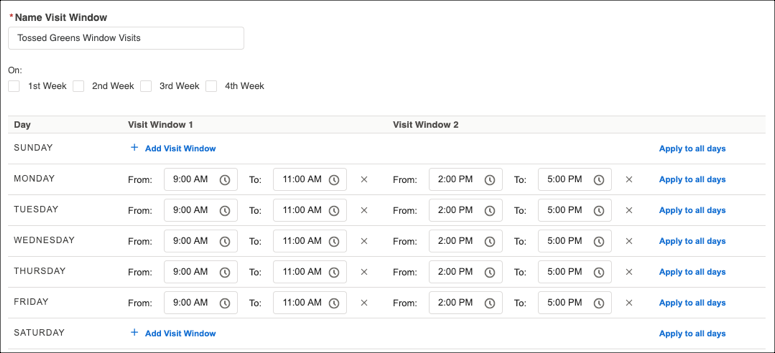
Under Default Visit Windows, name and specify your shared visit window time frame.
For example, you create a shared visit window for all Tossed Greens restaurant
franchise locations. The franchises prefer visits that begin and end on weekdays between 9:00
AM to 11:00 AM or 2:00 PM to 5:00 PM.
-
Save your work.
-
To make it easy for your reps to select a shared visit window from an account record,
create a lookup relationship with visit windows. Then create a custom menu option on the
routable object and add it to the record page layout.
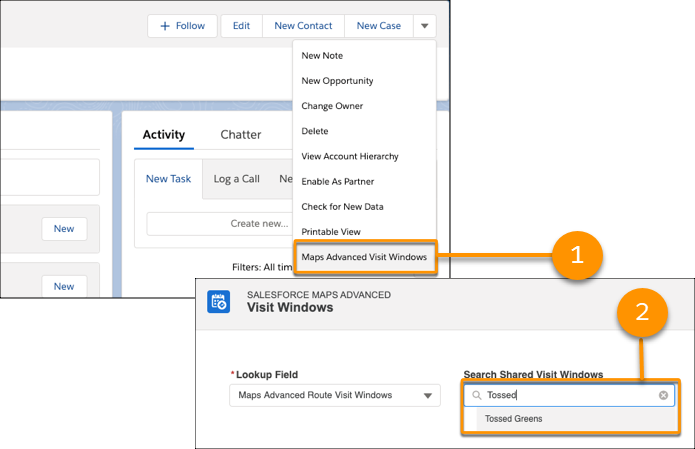
For example, an account record has a custom menu option named Maps Advanced Visit
Window (1). When the rep selects the option, shared visit windows appear. The rep selects a
visit window to link to the account record (2).