
The Mobile Builder for Seller-Focused Experience user interface makes configuring record home pages easy.
Required Editions
| Available in: Lightning Experience |
| Seller-Focused Mobile Experience is available in: Salesforce Mobile App for Android and iOS on phones and tablets in all editions, except Database.com. |
Here’s a breakdown of the parts of the tool.

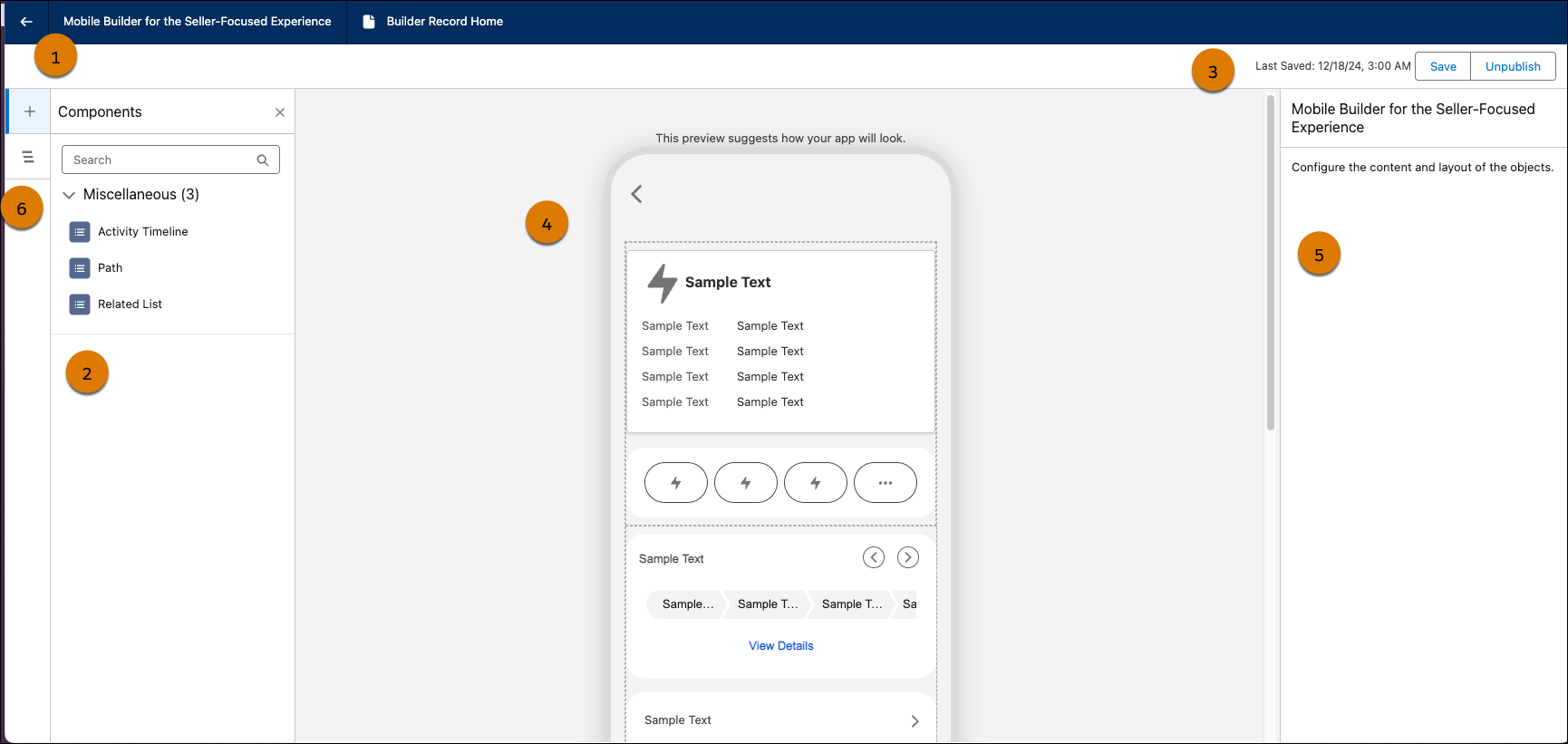
The header shows you the label of your page. From here you can return to Setup without saving by clicking the Back arrow. (1)
The component palette lets you drag components onto the canvas to create native pages. (2)
In the status bar, you can check whether your configuration is active or a draft, see when it was last modified, and publish or save. (3)
The page canvas area is a preview of your screen. Click a component to copy, delete, or move the component. Clicking a component also brings up properties to edit in the Properties pane.(4)
Edit component details in the Properties pane. Click a component in the canvas to see that component’s options in the Properties pane. (5) Some components in the Properties pane contain links to further configuration.
Clicking the component tree toggle lets you see your selected components. (6) From here, you can interact with a component and delete it.
- Add a Component to a Record Home Page
Add an activity timeline, path, or related list. Each component can be added only once. - Reorder Components on a Record Home Page
Change component order to work efficiently for your users. - Delete Components on a Record Home Page
Remove a component you don't want your users to access. - Create a Quick Action
A Quick Action performs a specific action in Salesforce, such as creating or updating a record. Quick Actions can help streamline your users’ experience. For example, you might need to update a lead status while on the go. Why bring up the full edit screen when you can create a quick action to update just the lead status? - Publish a Configuration for Seller-Focused Mobile App
Give users access to your customized native record pages in Seller-Focused Mobile Experience.