
Generate prospects from a specific account and assign them to a sales rep with Agentforce Prospecting.
Required Editions
| Available in: Lightning Experience |
| Available in: Enterprise, Performance, Unlimited, and Developer Editions with the Agentforce for Sales or Agentforce for an Industry add-on, or in Agentforce 1 Sales and Industry Editions where included. Requires each user to have the Agentforce for Sales or Agentforce for an Industry add-on to access actions. |
| User Permissions Needed | |
|---|---|
| To generate prospects from an account: | Sales Agentic Prospecting |
Before you begin: Turn on Agentforce Prospecting
- Open the account page in Salesforce you want the agent to generate prospects from.
-
In the dropdown, select Generate Prospects from Account.
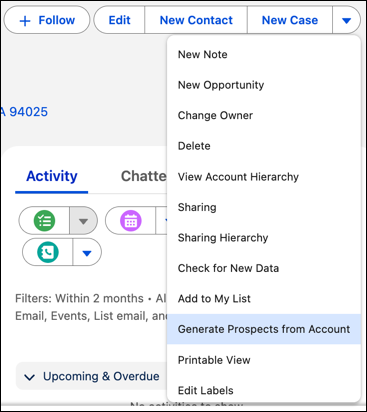
- Select the Prospecting Agent to generate the prospects.
- Assign the prospects to a licensed sales rep and enter the maximum number of prospects to generate.
-
Click Generate.
When the process is complete, you receive a notification regarding the number of prospects generated.