
Expand the customization, precision, and sophistication of your incentive compensation management plans with Salesforce Spiff. Create custom roles with the specific combination of permissions you want users to have.
Required Editions
| Available in: both Salesforce Classic (not available in all orgs) and Lightning Experience |
| Available in: Enterprise, Unlimited, and Developer Editions |
| Available for an additional cost in: Professional Edition with Web Services API Enabled |
Fine-tune Access Control for Incentive Compensation Functionality with Custom Roles
Implement a more trusted, efficient environment for managing your company’s unique incentive compensation resources. Instead of trying to fit your users into default Salesforce Spiff roles, create custom roles where you can give access to only the specific functionality that different groups of users need to be successful. Get started quickly by selecting an existing role that you want to use as a starting point.
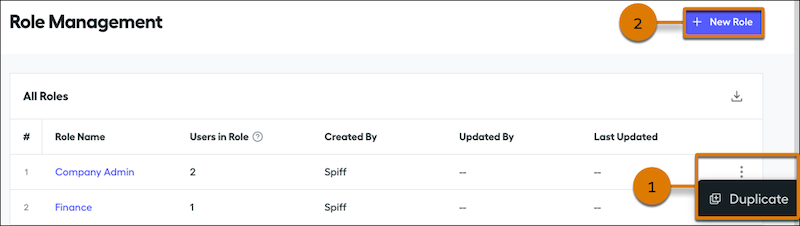
How: From the Admin menu, select Role Management, where you can duplicate an existing role. Find a role in the list, click the three dots menu, and select Duplicate (1). Or, click New Role (2) and select an existing role that you want to duplicate.
Custom roles have these limitations.
- After you create a custom role, it can take up to two minutes before the new role can be assigned to a user. After you edit a custom role that’s assigned to a user, it can take up to two minutes before the user’s account reflects the changed permissions.
- When you import user records or sync user records with a connector, you can’t specify a custom role. You can only assign custom roles to individual users that have been created in Spiff.
- You can’t delete a custom role.
See: