
Guide your sales reps toward meeting quotas when you publish plans from Quota Planning to territory-based forecasting types within Pipeline Forecasting.
Required Editions
| Available in: both Salesforce Classic (not available in all orgs) and Lightning Experience |
| Available for an additional cost in: Enterprise, Performance, Unlimited, and Developer Editions with Sales Planning in English only, and only if you have Web Services API enabled |
| User Permissions Needed | |
|---|---|
| To publish plans: |
One of these:
|
Confirm these items.
- You have an active territory model with designated forecast managers in Sales Territories.
- Your forecast type includes a territory-based hierarchy with the option to show quotas.
- In Sales Planning, open a sales plan, select a segment, and then open a quota plan within it.
-
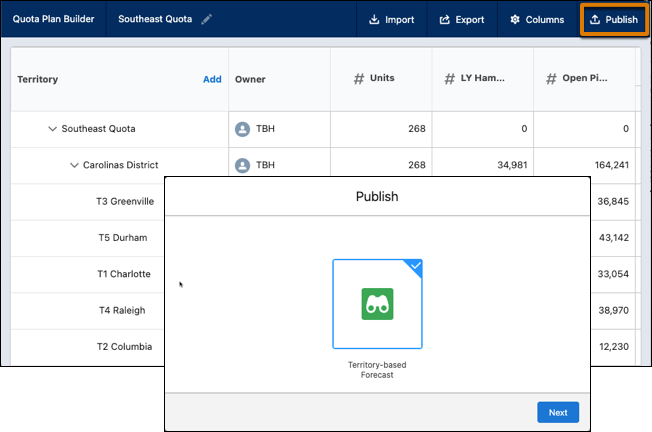
Click Publish, and then select Territory-based
Forecast.
-
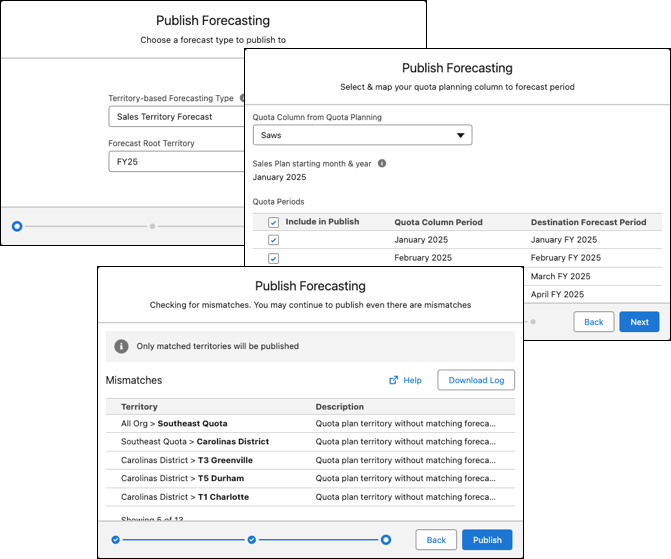
Select a territory-based forecast type and a root territory. Then, select a quota
column from your plan. Identify any mismatched territories, and then publish the ones that
match.
- Click Publish.