
Reach your quota by using a plan that you create with input from your manager in Quota Attainment Planning. Prioritize important accounts, track expected revenue, and itemize potential losses.
Required Editions
| Available in: both Salesforce Classic (not available in all orgs) and Lightning Experience |
| Available for an additional cost in: Enterprise, Performance, Unlimited, and Developer Editions with Sales Planning in English only, and only if you have Web Services API enabled |
| User Permissions Needed | |
|---|---|
| To create and update quota attainment plans: | Quota Attainment Planning User permission set |
- In Quota Attainment Planning, select the year that your plan applies to.
- In the Territory Level Strategy area, draft your strategy, and then save your changes.
-
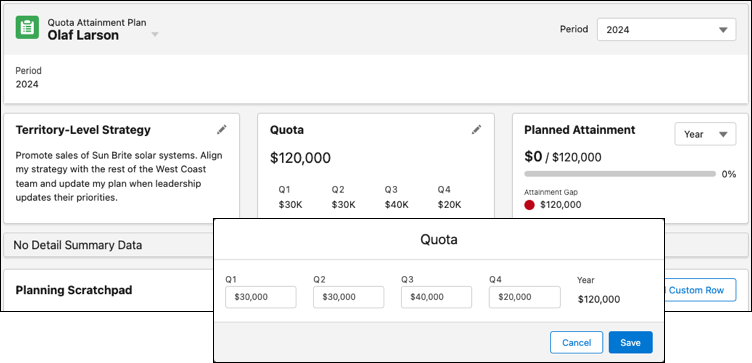
In the Quota area, enter your planned quota for each quarter, and then save your
changes.
-
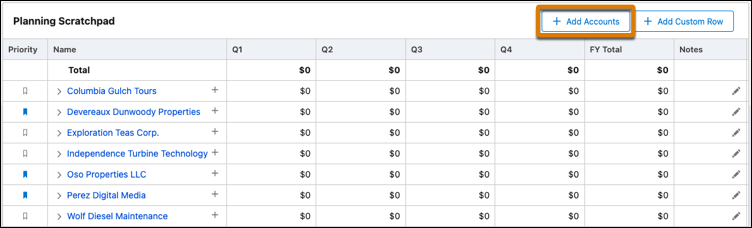
To add any of your accounts that play a role in your quota attainment plan, click
Add Accounts. Search for specific ones, or add all the accounts
you own. Then flag key accounts that you consider priorities.
- To add rows in which you track your planned attainment, click Add Custom Row. Add as many rows for items that can affect your bottom line, such as Planned Attainment and Expected Attrition.
- Enter the amounts that you expect to generate or lose for each item on a quarterly basis under any of your accounts.
Quota Attainment Planning adjusts your plan based on the amounts you enter and gives your manager access to your plan details.