
Meet and exceed leadership’s expectations by using a plan that you create based on your reps’ quota capacities in Quota Attainment Planning. Identify which reps are on the path to attainment and the ones who require guidance. That way, the whole team wins.
Required Editions
| Available in: both Salesforce Classic (not available in all orgs) and Lightning Experience |
| Available for an additional cost in: Enterprise, Performance, Unlimited, and Developer Editions with Sales Planning in English only, and only if you have Web Services API enabled |
| User Permissions Needed | |
|---|---|
| To create and update quota attainment plans: | Quota Attainment Planning User permission set |
- In Quota Attainment Planning, select the year that your plan applies to.
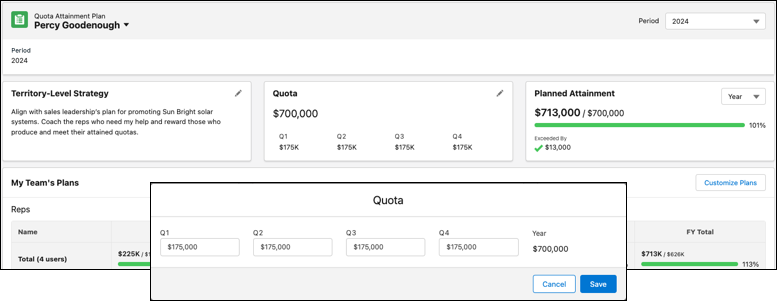
- In the Territory Level Strategy area, draft your team’s strategy, and then save your changes.
-
In the Quota area, enter your team’s overall planned quota for each quarter, and then
save your changes.
-
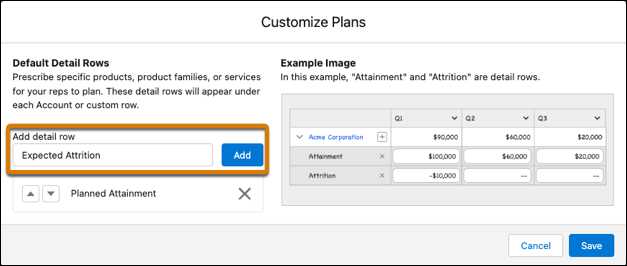
To add account line items for your direct reports to address in their plans, click
Customize Plans. Add rows with item details. Then save your
changes.
The rows you add can include anything that contributes to or takes away from planned quotas, such as sales estimates or expected attrition for specific products or services.
- Tell your direct reports to plan for their quota attainment.
-
Identify how your team’s performance aligns with your overall quota attainment
plan.
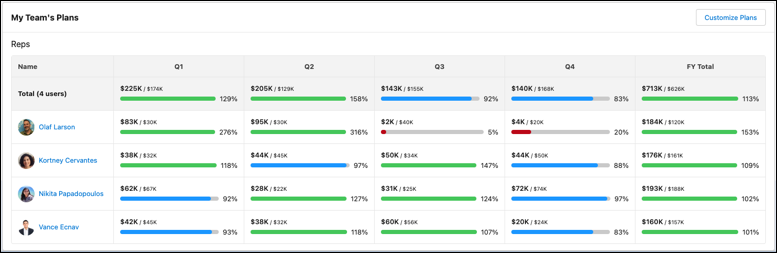
Quota Attainment Planning adjusts your team’s plan based on the amounts your reps enter. Your managers can access your team summary, but they can’t access details about each rep’s quota attainment plans.