Learn how Agentforce Pipeline Management can help sales teams free up bandwidth for bigger tasks by providing actionable, timely suggestions for managing opportunities.
Required Editions
| Available in: Lightning Experience |
| Available in: Enterprise, Performance, Unlimited, and Developer Editions with the Agentforce for Sales or Agentforce for an Industry add-on, or included in Agentforce 1 Sales or an Industry Edition. Requires each user to have the Agentforce for Sales or Agentforce for an Industry add-on to access the actions. |
With Agentforce Pipeline Management, the Sales agent reviews recent notes, calls, or emails to provide field update and meeting follow-up suggestions for opportunities.
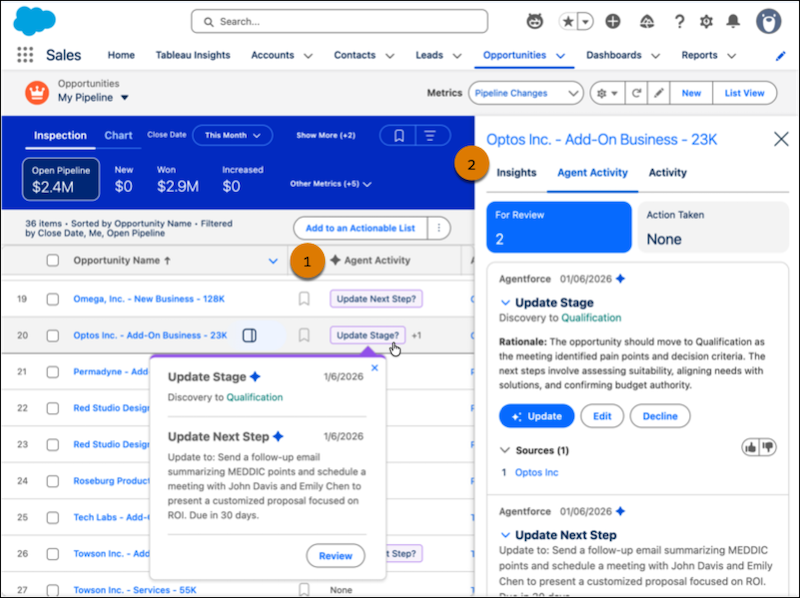
You can view the agent’s pipeline management suggestions in Pipeline Inspection. Quickly take action from the status in the Agent Activity column (1) or review the suggestions in more detail in the side panel (2).
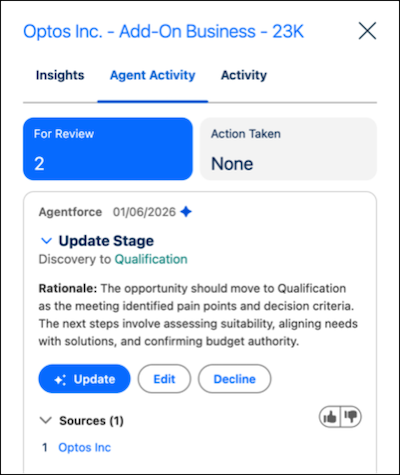
Accept, decline, or edit a suggestion from the side panel. You can also view the rationale and sources used, so you can be confident that it’s grounded in relevant data about the opportunity.
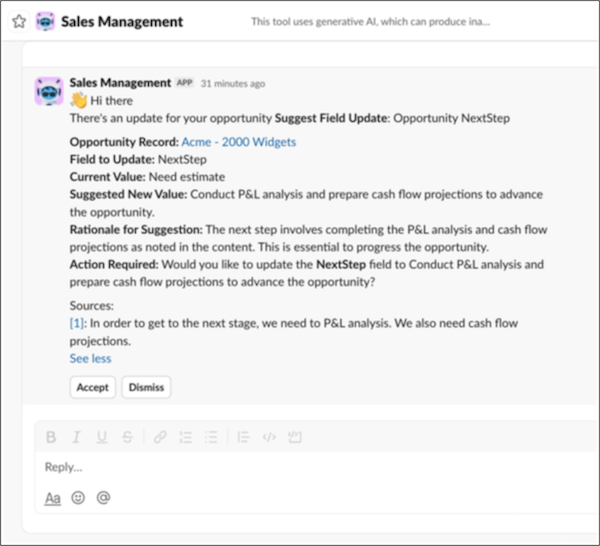
When the agent is added to Slack, you can receive Pipeline Management notifications about your opportunities directly in your flow of work. By default, the agent sends up to 15 Pipeline Management notifications in Slack per day.