
View and update deal progress using a structured sales methodology directly from Pipeline Inspection. The Sales Methodology column shows step-level progress and lets you update details from a side panel without leaving Pipeline Inspection.
Required Editions
| View supported editions. |
Understand Methodology Status
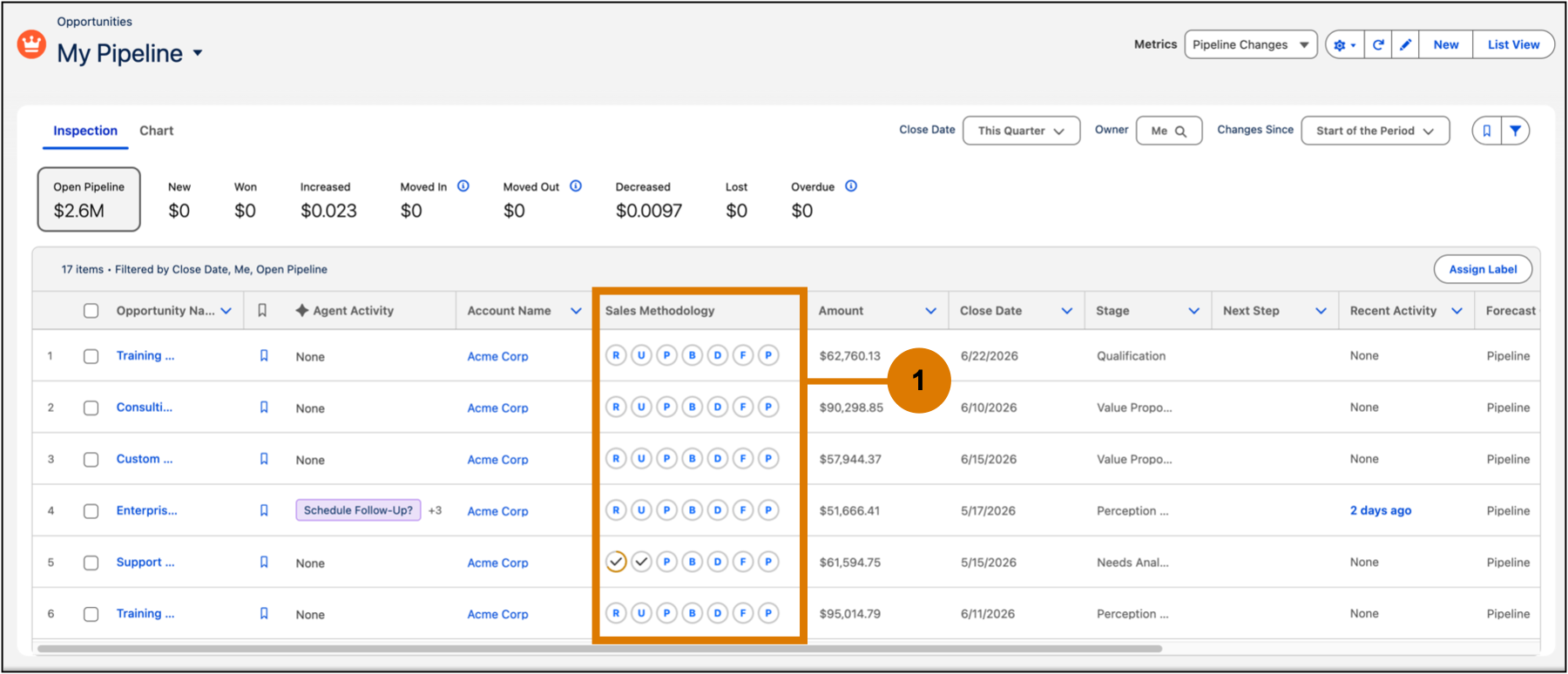
The Sales Methodology column shows steps in your methodology as a compact set of icons (1). Each icon reflects how complete or strong that step is for a deal. When you hover over an icon, a window appears to show a quick progress summary.
| icon | Indicates... |
|---|---|
 |
No notes or confidence level added |
 |
Notes added without a confidence level |
 |
Low confidence set without notes |
 |
Notes added with low confidence |
 |
Medium confidence set without notes |
 |
Notes added with medium confidence |
 |
High confidence set without notes |
 |
Notes added with high confidence and marked complete |
Update Methodology Steps
Update methodology steps directly from the pipeline view. Click any icon in the Sales Methodology column to open the side panel and make updates.
- Add notes to capture key details for each step.
- Set a confidence level by selecting Low, Medium, or High to reflect deal strength.
- Update details as the deal progresses to keep information current.
- Save your updates without leaving the pipeline view to keep your data accurate.

Tip Turn on Pipeline Management to get suggestions for updating criteria or
confidence levels based on notes, calls, and emails. When there's relevant information to
update a methodology field, you see a suggestion in the Agent Activity column on Pipeline
Inspection.