Identity Resolution uses matching and reconciliation rules to link data from multiple
sources about people or accounts into unified profiles for segmentation, insights, and reporting.
In Prospecting Center, Identity Resolutions unify data that’s coming in from Data 360 into the
Prospecting Center, so your Sales reps don’t waste their time evaluating duplicate
records.
Required Editions
| Available in: Lightning Experience |
| Available with Sales Engagement, which is included with Sales in
Performance, Unlimited Editions, Agentforce 1 Edition, and
available for an extra cost in Professional and Enterprise Editions.
Sales Engagement is also available for an extra cost in Service and Lightning
Platform.
|
| User Permissions Needed |
| To create identity resolution rulesets: |
- Data Cloud Admin OR
- Data Cloud for Marketing Admin OR
- Data Cloud for Marketing Data Aware Specialist
|
-
In the Salesforce Data Cloud app, click the Identity Resolution tab.
Click New.
-
For Data Space, select Default.
-
For Primary Data Model Object, select Individual,
Account, or Leads. Click
Next.
-
Enter a name for the rule. Click Save.
-
On the new Identity Resolution object home, under Ruleset Properties, click
Configure next to Match Rules.
-
To unify profiles coming from different data sources, click Add Match
Rule. Select the default match rule, for example, Fuzzy Name and Normalized
Email.
-
Click .
-
Click Run Ruleset for Data 360 to build the unified profiles
records. This process can take a few minutes. An entity can have up to two published rulesets
in a data space.
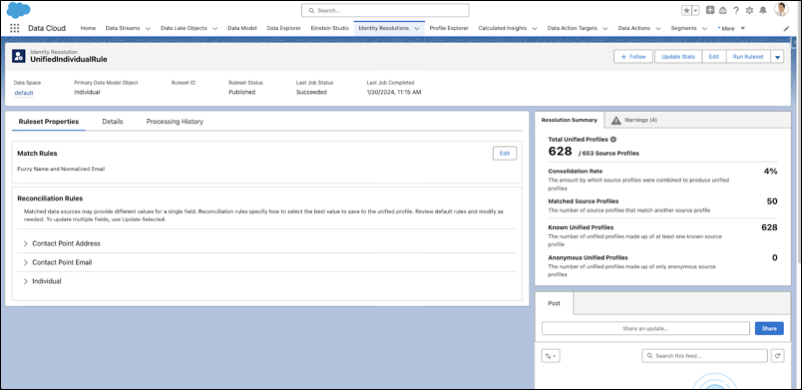
After you complete this step, your Identity Resolution ruleset mirrors this image. You
see a Resolution Summary on the right-side panel denoting the total number of unified individual
profiles created, based on your match and reconciliation rules.