
When you view details that appear in the Salesforce Side Panel, you can also search for additional Salesforce records. Search results display contacts and any other records with which you can associate tasks, such as a campaign, a case, or an opportunity.
Required Editions
| Available in: Salesforce Classic |
| Available in: Lightning Experience, if Salesforce Classic is available in your org. |
| Available with the purchase of Sales Cloud or Government Cloud in: Personal, Contact Manager, Professional, Enterprise, Performance, Unlimited, and Developer Editions |

Important Full product retirement for Salesforce for
Outlook is scheduled on January 30, 2027. See Salesforce for Outlook Retirement. To keep
integrating Microsoft Outlook with Salesforce, check out our next-generation products: the
Outlook integration and Einstein Activity Capture. See Move from
Salesforce for Outlook (Retiring) to the Next-Generation Products.
Complete this procedure using the Salesforce Side Panel, a feature that's available in Salesforce for Outlook. You can learn about the side panel in Add Microsoft® Outlook® Emails to Salesforce Records.
- From Outlook, select an email for which you want to display additional Salesforce records.
-
In the side panel, click
 .
.
-
Type your search term. For example, if you want to search for Salesforce records
related to desktops, type desktop.
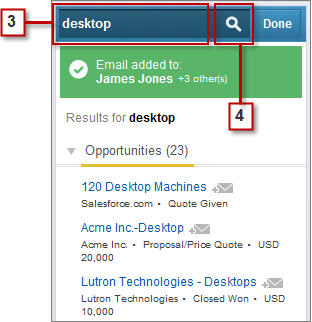
- Click the search icon to display Salesforce records related to your search term.