
Automatic Account Assignments for Synced Contacts in Salesforce for Outlook (Retiring)
After syncing contacts from Outlook, Salesforce for Outlook tries to automatically assign them to accounts.
Required Editions
| Available in: Salesforce Classic |
| Available in: Lightning Experience, if Salesforce Classic is available in your org. |
| Available with the purchase of Sales Cloud or Government Cloud in: Personal, Contact Manager, Professional, Enterprise, Performance, Unlimited, and Developer Editions |
| User Permissions Needed | |
|---|---|
| To assign accounts: | Read on accounts and Edit on contacts |
| To create new accounts: |
Create on accounts and Edit on contacts AND Show Quick Create |

Important Full product retirement for Salesforce for
Outlook is scheduled on January 30, 2027. See Salesforce for Outlook Retirement. To keep
integrating Microsoft Outlook with Salesforce, check out our next-generation products: the
Outlook integration and Einstein Activity Capture. See Move from
Salesforce for Outlook (Retiring) to the Next-Generation Products.
After syncing contacts from Outlook, Salesforce for Outlook tries to automatically assign them to accounts, as shown in this diagram.
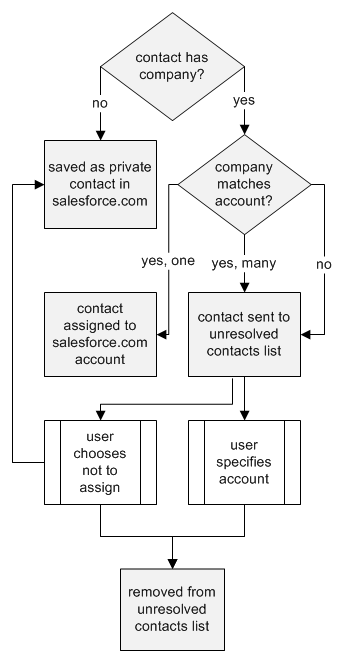
This table describes the account assignment process.