
Review considerations for deleting opportunities.
Required Editions
| Available in: Lightning Experience and Salesforce Classic |
|
Available in: all editions for orgs created before Summer ’09 Available in: Essentials, Group, Professional, Enterprise, Performance, Unlimited, and Developer Editions for orgs created in Summer ’09 and later |
Who Can Delete Opportunities
You can delete an opportunity when you’re one of these users.
- A Salesforce admin
- The opportunity owner
- A user who is higher than the opportunity owner in the organization role hierarchy
You must also have the Delete permission on opportunities.
How to Delete an Opportunity
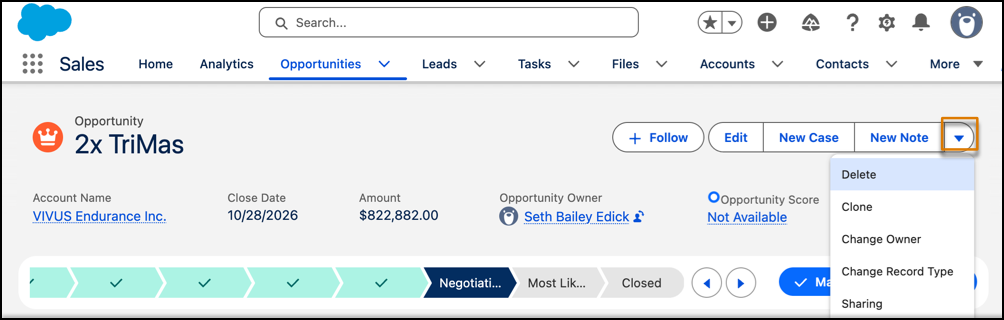
To delete an opportunity, use the dropdown menu button to select Delete. The Delete option only appears if you have the proper permission.
What Gets Deleted with an Opportunity
Deleting an opportunity also deletes these related records.
- Attachments
- Competitor strengths and weaknesses
- Contact roles
- Events
- Notes
- Partner relationships
- Quotes
- Quote line items
- Quote PDF files
- Spits
- Stage history
- Tasks
Deleting an opportunity doesn’t delete these related records.
- Accounts
- Contacts
Recycle Bin
- Restore deleted opportunities from the Recycle Bin.
- Restoring opportunities from the Recycle Bin also restores their related items.