
Preview a module and units that you’re working on in your local Trailmaker Content workspace, and share the preview with collaborators. This preview provides an opportunity for content creators and collaborators to review formatted content before it’s added to a release. The preview is read-only, limited to one module, and isn’t available for a trail.
Required Editions
| Available in: Enterprise, Performance, and Unlimited Editions |
| User Roles and Permissions | |
|---|---|
| Enablement Site User Roles | |
| This topic supports these enablement site roles: | Content Creators |
| Required System Permissions | |
| To launch a preview from Trailmaker Content: | Create Content |
You can preview content from Trailmaker Content and Trailmaker Release. What's the difference?
| Preview Context | What's Available | Who Can Access It |
|---|---|---|
| Trailmaker Content | Preview a module that’s in your local workspace. The preview is limited to the current module and its units, and shows only the source language, not any localized content that’s included in the module’s backpack. This preview isn’t available for a trail. |
|
| Trailmaker Release |
Preview a full release that’s created for a particular content collection. This preview shows:
|
Only users with the Preview Release permission can access the full release preview URL. |
For information about the full release preview, see Preview a Release in Trailmaker Release.
To launch and share a preview in Trailmaker Content:
- In the Trailmaker Content workspace, click the module title, or select Edit from the module’s Actions menu.
-
On the module or unit page, click Preview.
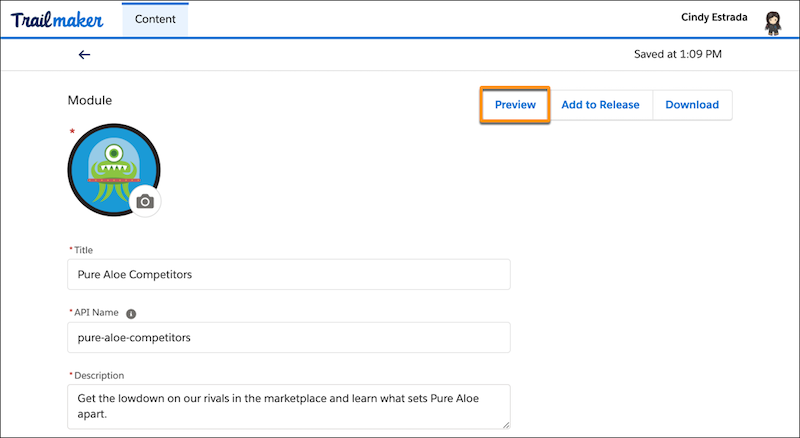
-
To share the preview with collaborators, click Share Preview in
the preview banner.
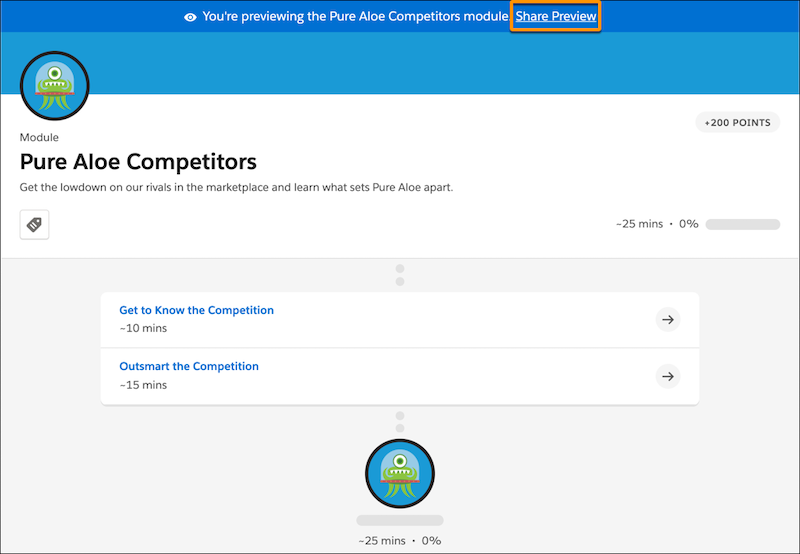
-
In the Share preview window, enable sharing.
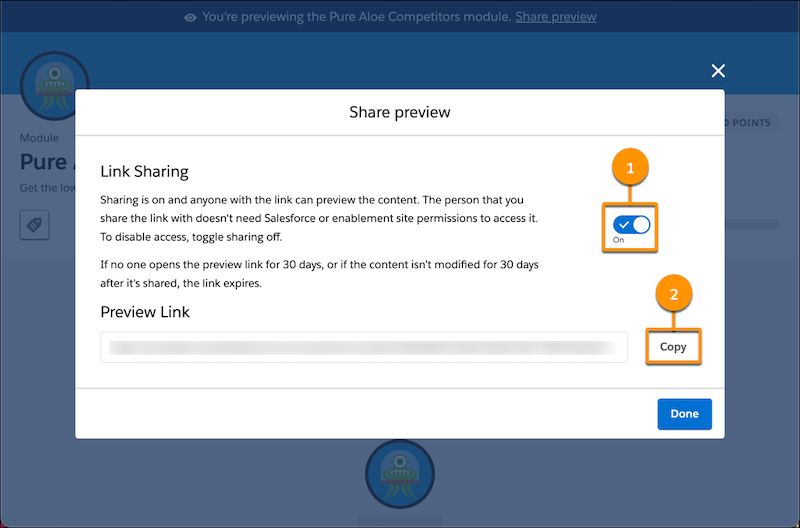
- Toggle Link Sharing on (1). Sharing is disabled by default.
- To copy the preview link, click Copy (2).
- Click Done.
- Paste the preview link in an email, Slack message, or other direct message to collaborators.

The content preview is read-only. You can view quizzes and see the correct answers, but you can’t complete the quiz like you can in the full release preview.
The preview is available only in English, and it doesn’t support selecting other languages.
The preview link expires after 30 days of inactivity, which is defined as:
- No one has visited the preview link for 30 days after it was created.
- The person who shared the preview hasn’t modified the module or its units in Trailmaker Content for 30 days after the preview was created.
To disable sharing so that the preview is visible only to you, toggle Link Sharing off. You can always re-enable sharing later. If a collaborator tries to visit a preview link that’s been disabled, they receive an error.