
In Trailmaker Content, you can update content, correct errors, or revise metadata, such as a content title or applied filters.
Required Editions
| Available in: Enterprise, Performance, and Unlimited Editions |
| User Roles and Permissions | |
|---|---|
| Enablement Site User Roles | |
| This topic supports these enablement site roles: | Content Creators |
| Required System Permissions | |
| To create and edit content with Trailmaker Content: | Create Content |
-
Find the backpack that you want to import. You can:
- Access the backpack in your company’s version control system (VCS).
- Download the latest released version of the backpack from Trailmaker Release. To learn more, see Download a Backpack from Trailmaker Release.
-
Import the backpack into your Trailmaker Content workspace by completing the steps in Import a Backpack into Trailmaker Content.
 Note When you import a backpack ZIP file that includes an invalid filter, the filter is marked as invalid in Trailmaker Content. If you don’t delete an invalid filter manually, Trailmaker removes it when you add the content to an unpublished release or download the content.
 - In the Trailmaker Content workspace, click the content title, or select Edit from the Actions menu for the module or trail.
-
Revise the content as necessary.
- Update text or formatting.
- Replace outdated graphics or videos.
- Remove an applied filter by clicking the remove icon
 next to the filter name.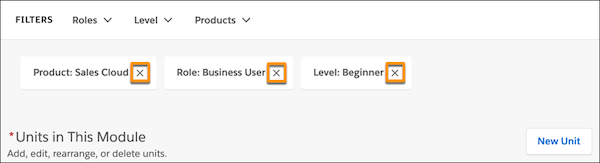
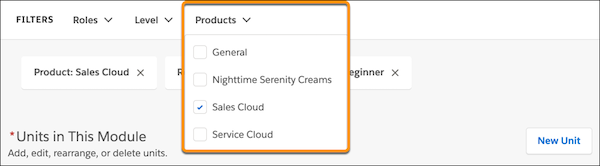
- Assign a new filter to the content by clicking the appropriate filter category and
selecting a filter value.
Note As you work, Trailmaker Content saves your changes to the cloud every few seconds. - Add the revised content to an unpublished release by completing the steps in Add Content to a Release from Trailmaker Content.
- Preview and publish the release.
- Download the latest released version of the module backpack, and store it in your VCS.
In the release preview mode, changes to filters are visible in the module, page headers, and on the list of filters that’s associated with each module or trail.
See Also
- Considerations for Managing Content in Trailmaker Content
- Import a Backpack into Trailmaker Content
- Manage Filters for Enablement Site Content
- Add Content to a Release from Trailmaker Content
- Preview a Module in Trailmaker Content
- Preview a Release in Trailmaker Release
- Publish Content with Trailmaker Release