
As you work in Trailmaker Content, use the formatting toolbar to style the content of your units. Trailmaker saves your changes to the cloud every few seconds.
Required Editions
| Available in: Enterprise, Performance, and Unlimited Editions |
| User Roles and Permissions | |
|---|---|
| Enablement Site User Roles | |
| This topic supports these enablement site roles: | Content Creators |
| Required System Permissions | |
| To create and edit content with Trailmaker Content: | Create Content |
-
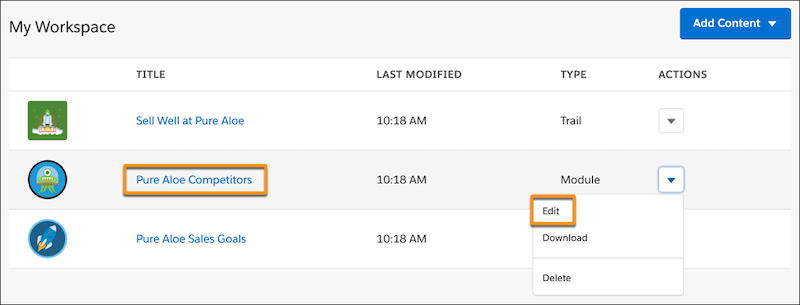
In the Trailmaker Content workspace, click a module title (1). Or, select
Edit from the Actions menu for a module (2).
-
On the module page, click a unit title, or select the edit icon
 for the unit
that you want to open.
for the unit
that you want to open.
-
Use the formatting toolbar to add styles.
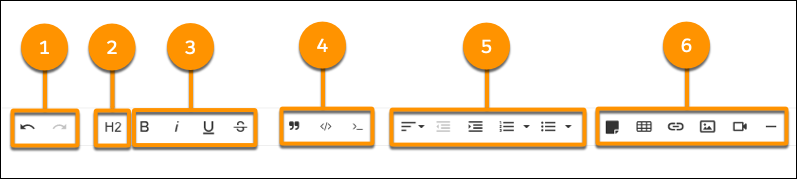
- Undo or redo changes (1).
- Create H2 topic headings, which appear in the list of topics in the side navigation bar on your enablement site (2).
- Format text as bold, italic, underlined, or struck through (3).
- Style a block of text to appear as a block quote, a code block, or inline code (4).
- Change the alignment of a paragraph, decrease or increase the indent of a paragraph, or create a numbered or bulleted list (5).
- Make a block of text appear as a boxed-text note; insert a table; embed a link, image, or video; or insert a horizontal rule (6).
You have a few options when you create a list. You can change the style of the bullets or how the list is numbered. And you can embed a list within a list.