
You can download the backpack ZIP file for a module or trail that’s in your Trailmaker Content workspace. Then, you can submit the backpack to your company’s version control system (VCS) so that other users can import the backpack into their own local Trailmaker Content workspace.
Required Editions
| Available in: Enterprise, Performance, and Unlimited Editions |
| User Roles and Permissions | |
|---|---|
| Enablement Site User Roles | |
| This topic supports these enablement site roles: | Content Creators |
| Required System Permissions | |
| To create and edit content with Trailmaker Content: | Create Content |
You can download backpacks from Trailmaker Content and Trailmaker Release. What’s the difference?
| =Downloaded From | Content Status |
|---|---|
| Trailmaker Content | Reflects the status of the content from your local workspace, including any edits or updates that you made. This content isn’t necessarily the same as the latest released version of the content, especially if the backpack has been shared among collaborators. |
| Trailmaker Release | Reflects the latest released version of published content. |
For information about downloading a backpack from Trailmaker Release, see Download a Backpack from Trailmaker Release.
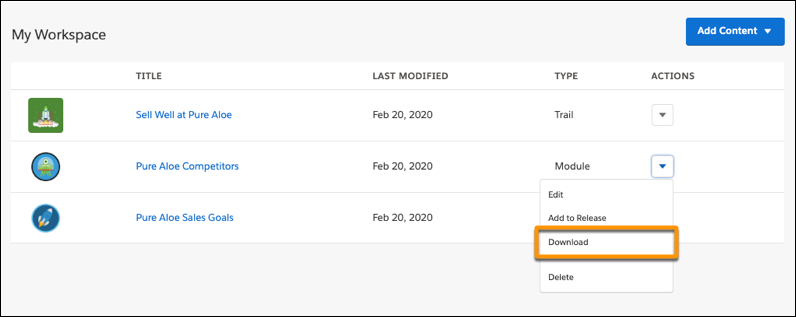
To download a module or trail backpack from your Trailmaker Content workspace:
- Click the Actions menu for a module or trail, and select
Download.
- From a module or trail page, click Download.
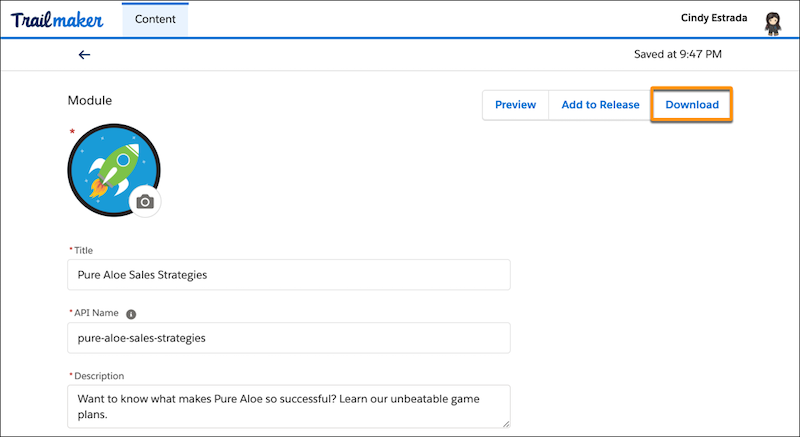

Note To download a trail and the modules in it, download the trail and each individual module.
Downloading the trail alone doesn’t download the modules within it.