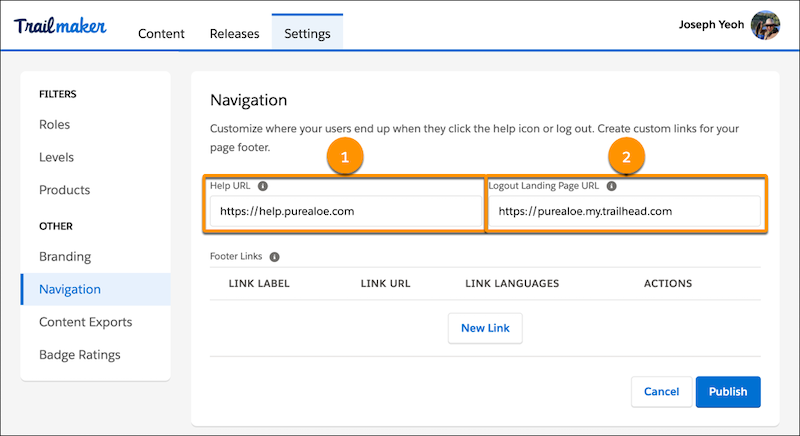
You can direct your enablement site users to your own help site, instead of Salesforce
Help, when they click the help icon. And when your users log out of your enablement site, you can
designate the page where they land.
Required Editions
| Available in: Enterprise, Performance, and
Unlimited Editions
|
| User Roles and
Permissions |
|
Enablement Site User Roles
|
|
| This topic supports these enablement site roles: |
Salesforce Admins |
|
Required System Permissions
|
|
| To customize the branding on your enablement site: |
Manage Site Settings |
-
Click the avatar next to your name on your enablement site, and select
Trailmaker.
-
Click Settings.
-
On the Navigation page:
- Enter the web address of your choice for Help URL (1). For example, the URL for your
company’s help site.
- Enter the web address of your choice for Logout Landing Page URL (2).
-
Click Publish.
-
Click Publish again to confirm the changes.
After you publish the changes, they become visible on your enablement
site.