
To back up all content that’s been published or archived on your enablement site, you can quickly download backpacks of all published and archived trails and modules. This option is also useful when you want to transfer your content to another system.
Required Editions
| Available in: Enterprise, Performance, and Unlimited Editions |
| User Roles and Permissions | |
|---|---|
| Enablement Site User Roles | |
| This topic supports these enablement site roles: |
|
| Required System Permissions | |
| To export all published and archived content: | Manage Site Settings |
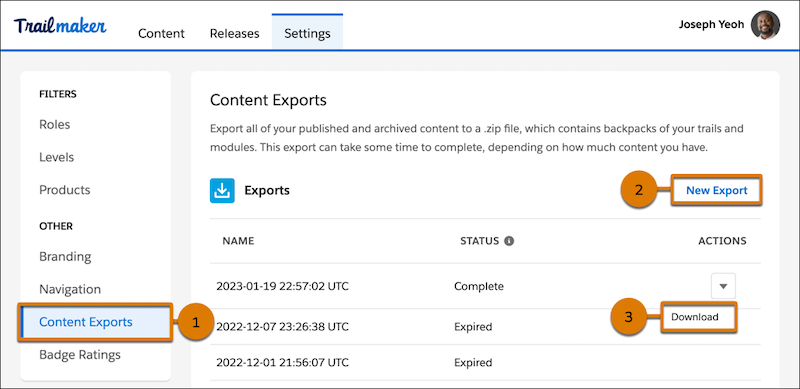
- In Trailmaker Settings, select Content Exports (1).
-
On the Content Exports tab, click New Export (2).
Depending on how much content is published or archived on your enablement site, the export process can take some time to finish. To check on the export’s status, refresh the page. When the export is ready, the Status column changes to Complete.
- From the Actions column, click Download (3).
Exports remain available to download for 30 days. You can begin a new export process every seven days.
The export format is a .zip file that contains the backpacks of all your published and archived content, including these artifacts.
- Any translations for your content in other supported languages
- Applied role, level, and product filters
- Any translations for your filter values in other supported languages.
You can store these backpacks in a version control system or reimport the backpacks one at a time into Trailmaker Content later. You can also use the backpacks to transfer content to other systems.